


One Blog or Multiple Sites? Start With the Goal, Not the URL
When you’re deciding between one blog or multiple websites, start with strategy. The right structure should amplify your growth - compounding authority, streamlining operations, and making it easier to measure what matters. The wrong one fragments effort and slows momentum.
Why this decision matters
Organic visibility, authority growth, and operational costs all hinge on where your content lives.
Your choice affects internal linking, crawl efficiency, analytics clarity, and brand perception.
"90.63% of pages get no organic traffic from Google." - Source (2017)
Quick answer (for most SaaS/startups)
If topics, product lines, and audiences substantially overlap: use one blog in a subdirectory (example.com/blog). Consolidated authority + simpler internal linking beats splitting too early.
If brands, audiences, or regulations differ materially (or teams operate independently): separate sites or strategic subdomains can win. This is common for distinct products, regions with compliance needs, or a support center that must operate as its own property.
Practical note: You can still use a blog with a custom domain or a clean domain-in-blog structure later. Start focused, prove traction, then expand deliberately.
What this guide covers
Domains vs. subdomains vs. subdirectories: what truly changes for SEO and users.
A practical decision framework by product, persona, and region.
Migration playbooks and how to operationalize the choice.
How BlogBowl removes the technical overhead and automates growth across any structure.
Domains, Subdomains, and Subfolders: What Actually Changes
Definitions with plain-English examples
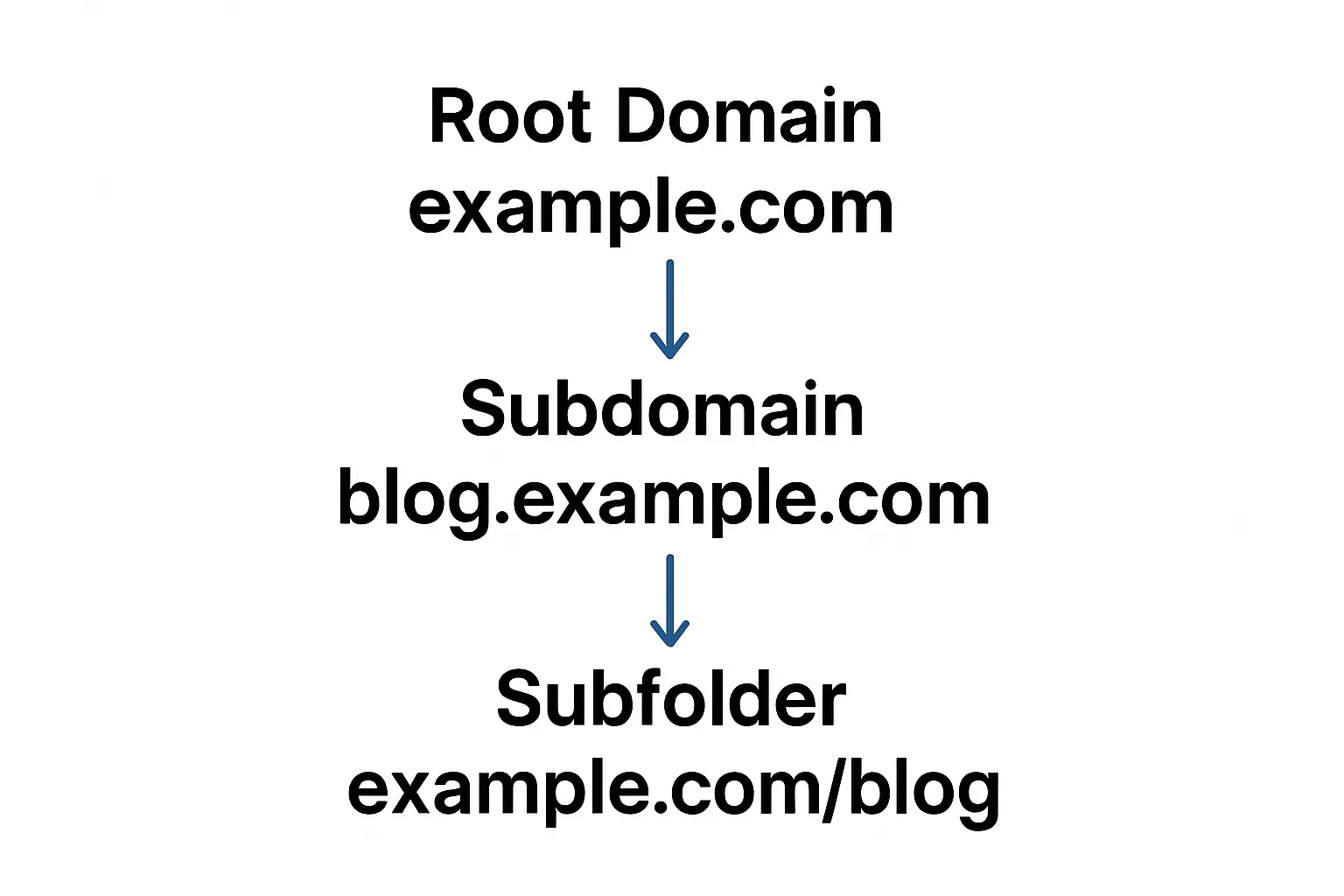
Root domain (example.com): your primary brand and authority hub.
Subdomain (blog.example.com): treated like a separate site; useful for distinct functions or audiences.
Subfolder/subdirectory (example.com/blog): lives under the root; inherits authority and simplifies internal linking.
Google treats both similarly - implementation quality matters.
"Google Web Search is fine with using either subdomains or subdirectories." - Source (Jan 2018)
SEO and UX implications you’ll feel
Authority flow and link equity distribution.
Subfolders consolidate signals into one domain; subdomains often need to earn authority separately.
Crawl patterns and indexation predictability.
Subfolders typically get crawled as part of the main site; subdomains may be discovered and learned independently.
Navigation consistency, branding, and perceived trust.
One domain, one nav, one brand experience tends to convert better; cross-domain or subdomain switches can feel disjointed if not tightly integrated.
Implementation realities
DNS and hosting separation for subdomains; easier vendor isolation.
Helpful when a blog with a custom domain or separate app stack must be isolated from your main site.
Simpler analytics, governance, and reporting for subfolders under one property.
One GA4/analytics view, unified goals, and cleaner attribution across content and product surfaces.
When in doubt
Choose the structure you can maintain consistently for 18–24 months without replatforming. For most teams juggling multiple sites or a domain-in-blog setup, fewer moving parts beat theoretical gains.
A Decision Framework by Product, Persona, and Region
Step 1: Map overlap vs. separation
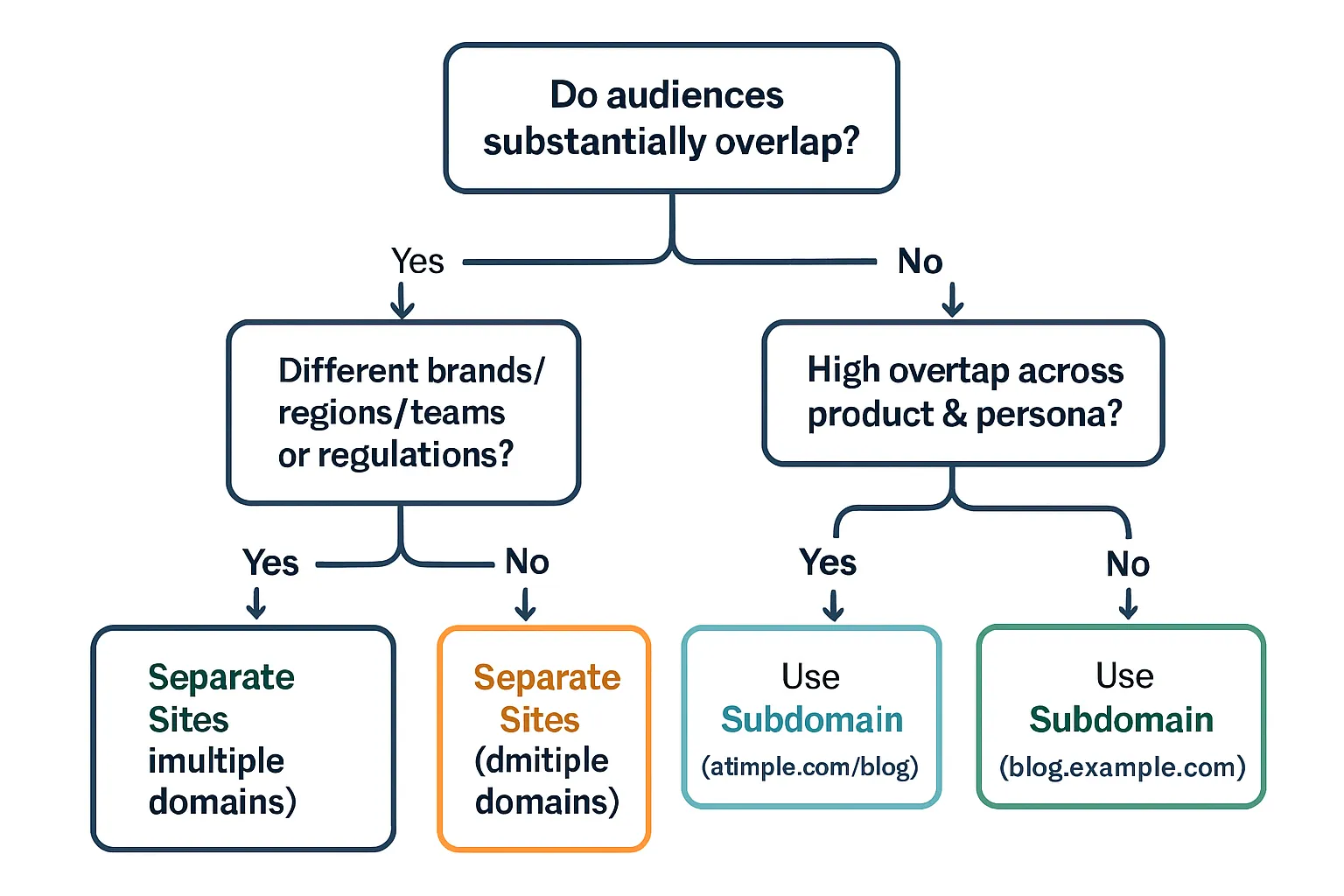
Product overlap: Do features, pricing, and go-to-market substantially intersect?
Persona overlap: Are the buyers the same decision-makers?
Regional/legal complexity: Do languages, currencies, taxes, or compliance differ?
Step 2: Score feasibility and resourcing
Content velocity needed, editorial ownership, and technical maintenance.
Internal linking potential (cross-promotion and cluster building) vs. siloing.
Step 3: Choose a structure
High overlap, limited resources: one blog in a subfolder.
Moderate overlap, distinct UX or tech need: subdomain for the section.
Low overlap, different brands/regions/teams: separate domains.
Step 4: Stress-test with 12-month roadmap
Can you publish, update, and interlink at the cadence required?
Do analytics/reporting and governance remain simple enough to act on weekly?
Scoring Matrix (1–5 scale)
1 = very low; 5 = very high. Example notes included.
Criterion | Score (1–5) | Example scoring notes |
|---|---|---|
Product Overlap | 5 | Same core features and pricing tiers across all content. |
Persona Overlap | 4 | Buyers are the same marketing decision-makers; similar JTBD. |
Regional Complexity | 2 | Mostly one language/market; minimal tax/consent variance. |
Governance Independence | 1 | One team owns strategy, content, and publishing cadence. |
Content Velocity | 3 | Weekly articles with quarterly updates to key pages. |
Total | 15 | Sum of scores across criteria. |
Recommendation | Consolidate (subfolder) | Heavier overlap + shared team favors one blog under example.com/blog. |
How to interpret totals:
5–11: Separate Sites (multiple domains) - low overlap or high regional/legal complexity; independent teams.
12–16: Split (subdomain) - moderate overlap but distinct UX/stack or security needs.
17–25: Consolidate (subfolder) - high overlap, shared buyers, simpler governance.
SEO Trade‑offs: Authority, Internal Linking, and Crawl Efficiency
Authority consolidation vs. fragmentation
Subfolders compound domain authority; easier to rank new content.
Putting your content under one blog in a subfolder (example.com/blog) concentrates link equity and E-E-A-T on a single domain. Each new post benefits from the authority you’ve already built.
This is especially powerful for startups that can’t build links to multiple websites simultaneously.
Subdomains and separate domains require independent link earning.
blog.example.com and entirely separate sites are treated more like distinct properties. They often need their own backlink profiles, citations, and brand signals to compete.
Choose this path when the audience, brand, or regulatory landscape truly differs, or when a separate tech stack is required (e.g., support portal or academy).
Practical takeaway: If your topics and personas overlap, consolidating early avoids splitting authority across multiple sites and accelerates time‑to‑rank.
Internal linking that moves rankings
One blog enables dense topic clusters, hub pages, and automatic cross-links.
Building clusters around core problems (e.g., “pricing strategy,” “user onboarding”) is simpler when everything lives under the same domain. Hubs link out to spokes; spokes reinforce hubs, lifting the entire cluster.
Cross-linking from educational content to product pages boosts relevance and discovery while strengthening conversions.
Separate properties need cross-domain links (strong but harder to scale).
Cross-domain links can be valuable, but they require careful anchor strategy, consistent publishing, and extra effort to maintain. You’ll also manage rel=“canonical” and UTM hygiene to avoid analytics confusion.
Expect slower compounding unless each property has its own dedicated editorial and outreach muscle.
Practical takeaway: If you don’t have the bandwidth to run link-building programs for multiple sites, keep a single, well-structured domain-in-blog setup.
Crawl and indexation stability
Subfolders: predictable discovery and shared sitemaps.
Content benefits from established crawl patterns, shared robots rules, and consolidated sitemaps. New posts are discovered faster when linked from existing high-authority pages.
One Search Console property, fewer moving parts, clearer coverage insights.
Subdomains: require separate discovery cadence; fine when consistently maintained.
Treat each subdomain as its own property: separate sitemaps, Search Console, monitoring, and potential crawl budget. This is not a problem if you maintain publishing velocity and internal links from the root.
Keep navigation, breadcrumbs, and XML sitemaps clean to stabilize crawl and indexation.
Practical takeaway: If you’re resource-constrained, subfolders reduce operational overhead and improve indexation predictability.
Featured snippets and sitelinks
Consolidation can improve entity clarity and win more universal SERP real estate.
A single, authoritative domain with clear architecture can increase the likelihood of sitelinks, rich results, and featured snippets by reinforcing a unified brand entity.
Fragmentation across multiple sites or subdomains can dilute signals and create keyword cannibalization between properties.
Where BlogBowl helps
Automatic internal linking and topic clustering ensure your one blog structure compounds authority efficiently.
Clean sitemaps, fast templates, and consistent navigation improve crawl efficiency and UX.
If you must run multiple sites, BlogBowl’s multi-blog management, shared analytics, and cross-property internal link suggestions keep your signals organized across subdomains or separate domains.
When Multiple Sites (Separate Domains) Are the Right Move
Choosing separate domains isn’t just a branding flex - it’s a strategic decision when audiences, operations, or governance need true separation. If any of the below apply, multiple sites can accelerate growth without diluting trust or overcomplicating UX.
Clear brand separation
Different positioning, tone, and communities (e.g., consumer vs. enterprise brands).
Distinct product narratives where cross-linking could confuse buyers or cannibalize keywords.
Independent reputations where each brand needs its own authority and PR footprint.
Signals you’re here:
You maintain separate roadmaps, messaging, and funnels.
You need different visual systems and navigation patterns.
One blog can’t credibly speak to both audiences without sounding generic.
Regulatory or operational boundaries
Country-specific compliance, payments, or data residency (e.g., GDPR, HIPAA, local PII storage).
Regional product differences (features, pricing, or service availability) requiring localized trust pages and legal disclaimers.
Multi-currency, tax, and invoicing flows that must be isolated.
Signals you’re here:
Your legal and finance teams require region-specific terms, privacy policies, and processors.
You need independent SLAs, status pages, or incident comms per region.
M&A and portfolio strategy
Maintain acquired brands while testing consolidation over time.
Protect existing rankings, backlinks, and community goodwill during integration.
Operate multiple websites while mapping a phased migration (content pruning, redirects, canonical alignment).
Signals you’re here:
Acquisitions come with strong branded search and meaningful direct traffic.
You plan to reuse parts of the content and replatform later without losing equity.
Community/UGC platforms
Content governance and moderation models may warrant isolation.
Separate domains help sandbox risk from user-generated content (e.g., forums, templates, inspiration galleries).
Different uptime, cache, and abuse-mitigation strategies than your marketing site.
Signals you’re here:
You require independent moderation policies and rate-limiting.
You want to isolate crawl load, CMS, or CDN choices from your main domain.
Playbook
Independent keyword maps per property:
Avoid overlap and cannibalization; define unique topical authority and SERP ownership goals.
Unique brand guides:
Messaging pillars, editorial tone, and visual systems that won’t be shared.
Link-building per site:
Dedicated digital PR, partner pages, and resource hubs; measure authority growth individually.
Separate analytics and governance:
Distinct GA4/Search Console properties, dashboards, and KPI targets.
Technical guardrails:
Own XML sitemaps, robots rules, hreflang (when applicable), and performance budgets per site.
Migration safety net (for future consolidation):
Keep URL inventories, backlink exports, and content maps ready; plan 301s, canonicals, and structured data alignment before any domain moves.
Where BlogBowl helps
Manage multiple websites and blogs from one dashboard with unified analytics rollups and per-domain filtering.
Assign separate editorial teams, brand kits, and publishing cadences per domain - no code required.
Automatic internal linking suggestions within each property, plus cross‑site linking recommendations when strategic.
If consolidation becomes viable, BlogBowl’s migration assistant exports URL maps, generates 301 plans, and preserves structured data to protect rankings.
When One Blog (Subfolder) Outperforms
Early-stage and resource-limited teams
One content engine compounds traffic and links faster.
Fewer moving parts: a single sitemap, Search Console, and analytics property, with consistent templates and CTAs.
Overlapping topics and buyers
Unified information architecture; clear pathways from content to product.
Topic relevance compounds on one domain, improving the odds of ranking new pages.
Monetization and UX coherence
Conversion tracking, CTAs, and personalization work across the same domain.
Fewer cross-domain tracking gaps; cleaner attribution from blog to signup to revenue.
Playbook
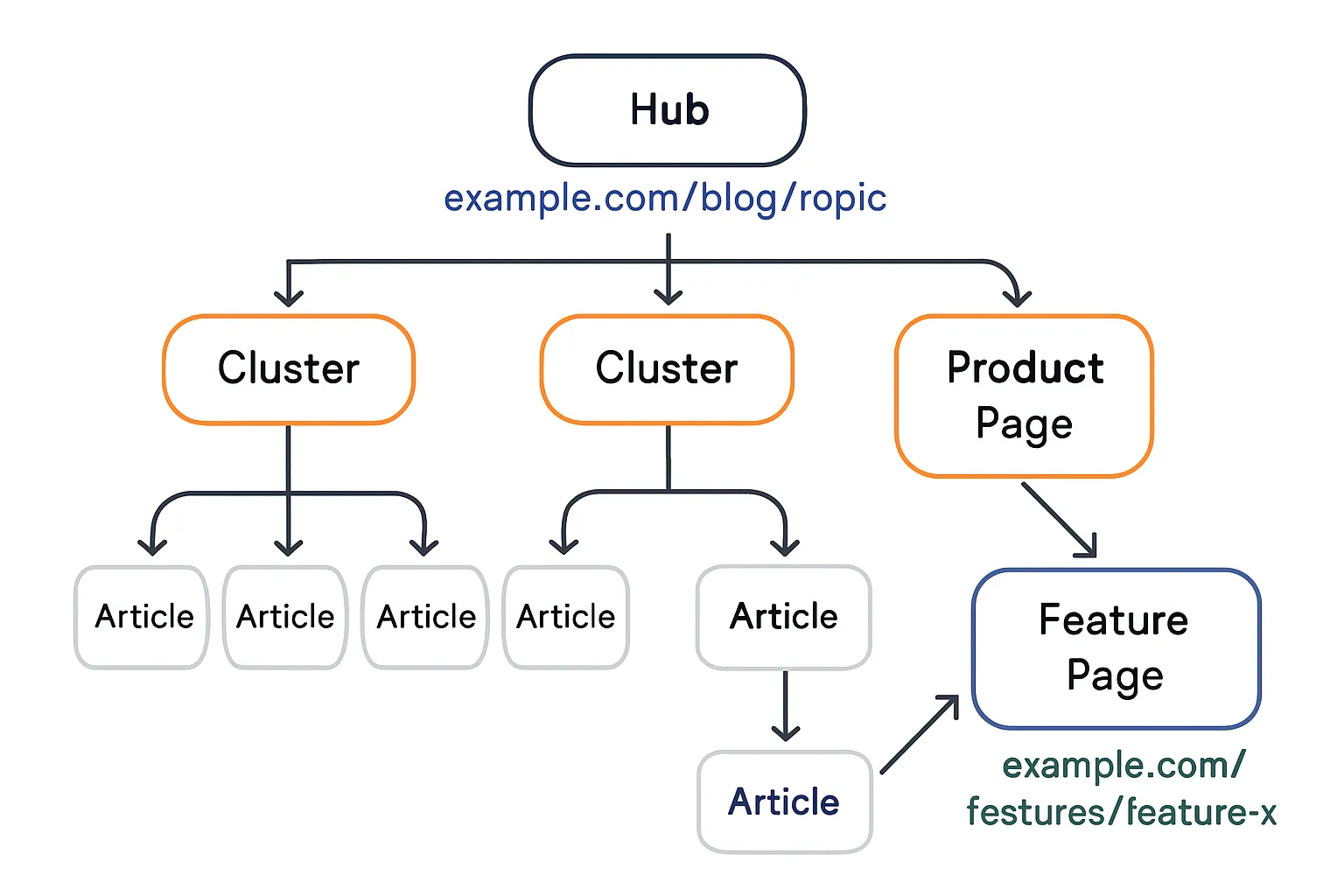
Topic clusters that interlink to product/feature pages.
Evergreen updates and internal link refreshes to push recrawl.
Use hub pages to target competitive, high-intent topics; spokes capture long-tail queries and pass authority inward.
Add contextual links from high-traffic posts to key product pages and comparison content to move readers down-funnel.
Where BlogBowl helps
Automatically generates topic clusters, internal links, and embedded media to lift E-E-A-T under one domain.
AI-powered refreshes keep evergreen assets current and re-crawl friendly.
Built-in analytics and newsletter tools turn your blog into a growth engine without extra tools or code.
When Subdomains Are Your Friend
Subdomains shine when you need separation without starting entirely new brands. They let you scale multiple sites under one umbrella while preserving uptime, security, and focus.
Technical necessity
Different tech stacks (docs, status, academy, community) isolated for uptime/security.
Vendor constraints or app boundaries that require their own hosting, runtime, or authentication.
Risk sandboxing for UGC or experimental features that shouldn’t impact the main domain.
Independent deploy pipelines and performance budgets (e.g., docs.example.com vs app.example.com).
What this buys you:
Tighter SLAs for critical surfaces (status.example.com).
Safer change management when your “one blog” wouldn’t fit the stack.
Cleaner permissioning and access control across teams and vendors.
Distinct UX or lifecycle
Education, developer portals, or forums with unique navigation and features.
Search models that differ from the marketing site (e.g., API reference search, forum threads, code snippets).
Alternate IA and session rules (guest browsing, login walls, profile systems) that don’t align with your main site.
Tip: Keep branding consistent, but let the IA and feature set focus on the user’s job-to-be-done (developers, students, or community members).
Regional teams with full autonomy
Separate releases, SLAs, or editorial calendars managed independently.
Region-specific support centers or academies requiring localized content, governance, and moderation.
Different cookies, currencies, data residency, and compliance policies that demand isolation.
Practical example:
apac.example.com for APAC go-to-market with its own help center and academy; na.example.com with US-compliant workflows and separate status pages.
Guardrails
Consistent branding; robust cross-domain linking; unified nav handoffs.
Keep logos, typography, and tone aligned; add “Back to main site” and persistent global nav elements.
Use prominent in-content CTAs to connect subdomain content to product and pricing pages on the root domain.
Treat subdomain as its own site for SEO (sitemaps, CWVs, link earning).
Separate XML sitemaps and Search Console properties.
Monitor Core Web Vitals per subdomain; optimize independently.
Build links to the subdomain’s best assets; cross-link judiciously from the root with descriptive anchors.
Maintain clear canonical tags; avoid duplicate content across subfolder and subdomain variants.
If multilingual, apply hreflang consistently within each subdomain (and across them if appropriate).
Measurement and governance
Use cross-domain tracking or roll-up reporting to keep journeys measurable.
Define subdomain-specific KPIs (activation, docs engagement, course completion) alongside root-domain growth goals.
Publish a routing policy: what lives on the root vs. subdomain vs. separate domain to prevent sprawl.
Where BlogBowl helps
Spin up a blog with a custom domain or subdomain in minutes, with fast, SEO-optimized templates.
Manage multiple websites and subdomains from one dashboard, including separate sitemaps, Search Console integrations, and analytics rollups.
Automatic internal linking and cross-domain link suggestions to connect academy/docs/community content back to your product pages.
Per‑property Core Web Vitals optimization and AI-generated media so every subdomain can rank and perform independently.
Ops, Governance, and Analytics: Make It Work Week to Week
Ownership model
Who approves topics, publishes, and updates? Central vs. distributed editors.
Define DRI per surface (blog, docs, academy, regional sites). Escalation paths for legal, security, and brand.
Shared playbooks: topic qualification, entity naming, schema patterns, and internal-link rules.
Analytics and reporting
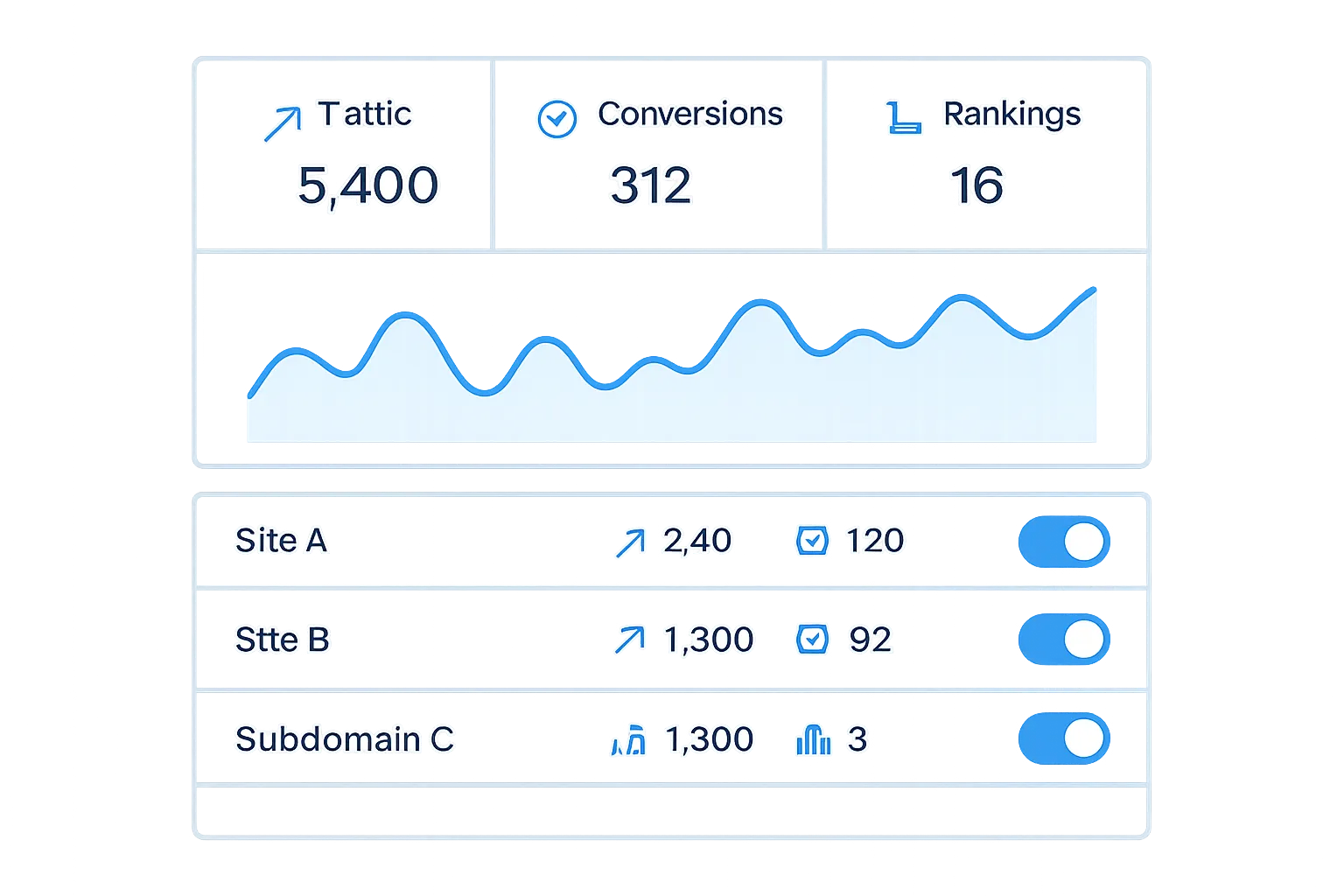
Single-domain: simpler funnels and attribution.
Multi-site: standardize UTM taxonomy; roll-up dashboards; per-site Search Console.
Maintain consistent goal definitions (signup, demo, activation), and align cookie consent/ID stitching across properties.
Editorial and automation
Calendars, cadences, and refresh cycles; entity consistency (schema, authorship).
Programmatic updates: quarterly refreshes for pillars; monthly boosts for top performers; weekly net-new content.
Automated internal linking, schema injection, and media embeds to keep clusters fresh and crawlable.
With BlogBowl
Manage unlimited blogs across domains/subdomains; automatic internal linking; AI-written, SEO-optimized posts; integrated analytics and newsletter.
Multi-property dashboards with roll-up metrics and per-site drill-down; Search Console syncing and change alerts.
Author permissions, brand kits, and publishing workflows per site - no code required.
Ops/SEO complexity: Subfolder vs Subdomain vs Separate Domains
Factor | Subfolder (example.com/blog) | Subdomain (blog.example.com) | Separate Domains (brand1.com, brand2.com) |
|---|---|---|---|
Setup Complexity | Low - same stack, simple routing | Medium - DNS + hosting split | High - new stack + full setup |
Ongoing SEO Effort | Low - signals compound | Medium - partial duplication | High - each site competes |
Link Building Needs | Low - one domain to grow | Medium - each property needs links | High - distinct campaigns |
Analytics Clarity | High - single property, clean funnels | Medium - cross-domain tracking | Low - fragmented, roll-ups needed |
Governance | Centralized - one team can own | Mixed - per-subdomain DRI | Decentralized - per-brand teams |
Speed to Rank | Fastest - inherits authority | Moderate - needs separate trust | Slowest - new authority from scratch |
Migration Playbooks: Consolidate or Split Without Losing SEO
Consolidating multiple sites into one blog (subfolder)
Inventory and mapping
Crawl/export all URLs, metadata, canonical tags, hreflang, and top queries/landing pages.
Classify: keep, merge, rewrite, or retire (410).
Create a 1:1 redirect map to final subfolder URLs (avoid chains).
Redirects and canonicals
Implement server-side 301s (edge/CDN preferred). No JavaScript/meta refresh.
Update all canonicals to point to the destination URLs; remove cross-domain canonicals unless consolidating identical content.
Maintain redirects for at least 12 months.
Content merge and de-duplication
Combine overlapping articles; preserve the strongest URL as the canonical target.
Keep high-signal elements stable (title, H1, intro) for the first 2–4 weeks, then optimize.
Retain authorship/date when it supports E‑E‑A‑T; add “updated” dates on refresh.
Internal links and navigation
Replace all legacy internal links with final URLs (no redirect hops).
Update nav, breadcrumbs, and footers to reflect the subfolder structure.
Rebuild hub-and-spoke clusters to concentrate authority.
Sitemaps and Search Console
Unify into root-hosted sitemaps (e.g., example.com/sitemap.xml) with only final URLs.
Verify all relevant properties in Search Console; submit new sitemaps; request indexing for top pages.
Keep legacy properties to monitor residual crawl errors.
Validation
Check server logs for 301 coverage and crawl patterns; eliminate 302/chain/loop outliers.
Monitor impressions, clicks, and position for top 100 pages/queries against baselines.
Splitting a section out (to subdomain or new domain)
Scope and freeze
Define the exact section, URL patterns, and assets moving.
Freeze publishing/editing for the section until redirects and canonicals are live.
Content and infrastructure
Clone content to the new host; switch canonicals to self-referencing on the target.
Move media to a shared CDN or update media URLs; avoid mixed-content issues (http→https).
Replicate schema, authorship, and structured data with new URLs.
Redirects and internationalization
Implement precise 301s from old paths to new subdomain/domain paths (single hop).
Rebuild hreflang across hosts with correct return tags (or use hreflang sitemaps).
Set up separate sitemaps for the new host; verify the new property in Search Console.
Links and discovery
Add prominent links from the root domain to the new subdomain/domain (header/footer/hub pages).
Replicate your top internal links as cross-domain links with descriptive anchors.
Outreach to update high-value backlinks to the new URLs.
Analytics and governance
Update GA4/GTM, conversions, and events; annotate the move date.
Establish KPIs for the new property; configure roll-up dashboards if needed.
Risk controls and QA
Rollout strategy
Staged cutover by directory/category; validate before scaling.
Use permanent 301s for migrations; do not leave 302s in place.
Technical QA
Zero redirect chains; zero soft-404s; consistent HTTPS; correct canonicalization.
Robots.txt allows crawling of final URLs; remove noindex on migrated pages.
Validate Core Web Vitals on new templates; ensure parity (titles/H1/meta).
Monitoring and remediation
Track: Coverage, Crawl Stats, 404/5xx rate, CTR/position for top queries, and server logs.
Expect 2–8 weeks of volatility; compare to pre-migration baselines weekly.
Maintain redirect and sitemap hygiene; fix outliers within 48–72 hours.
Where BlogBowl helps
Automated URL inventory, redirect mapping, and sitemap generation.
One-click internal link rebuilds and canonical/hreflang updates.
Search Console integration, alerting on crawl errors and coverage drops.
Migration checklists, GA4 annotations, and post-move dashboards to confirm recovery.
Conclusion: Your Best Bet - and How BlogBowl Gets You There
The practical rule
If your topics, products, and buyers largely overlap, start with one blog under a subfolder to maximize authority and simplify ops. Use subdomains or separate sites only when you truly need technical isolation, brand separation, or regional/legal autonomy.
Why choose BlogBowl now
Launch a professional, SEO-optimized blog in under 60 seconds - on a subfolder, subdomain, or full custom domain.
Automate daily content, internal linking, keyword research, and embedded media.
Manage unlimited blogs across multiple websites with built-in analytics and newsletters - no code required.
Ready to grow with a structure you won’t outgrow? Spin up your next blog or entire content network with BlogBowl and focus on the strategy - let us handle the tech and automation.