


Intro: Why a repeatable blog publishing workflow beats ad‑hoc blogging
Set the stage: from idea to publish a blog without chaos
If you’ve ever tried to publish a blog post “whenever it’s ready,” you know the chaos: shifting deadlines, last‑minute edits, missing images, broken links, and posts that sit in drafts for weeks. A repeatable workflow fixes that. It’s a clearly defined, step‑by‑step process - from brief to drafting, edits, approvals, QA, on‑page checks, and scheduling - that your team follows every time for creating blog posts. The result is predictable cadence, higher quality, and less stress.
What is a repeatable workflow? Think of it as your editorial assembly line for blog article writing:
Inputs: a brief with target keywords, outline, goals, and success metrics.
Process: drafting, editorial review, SEO checks, and approvals.
Outputs: scheduled publication, distribution, and post‑publish monitoring.
Feedback loops: analytics inform refreshes and future content choices.
Why it matters at scale:
Faster time‑to‑publish: Reduce hand‑offs and waiting with clear roles and automated triggers.
Consistent quality: Checklists and preflight rules ensure every post meets your standards.
Fewer errors: Automated on‑page checks catch missing meta, broken links, and schema issues before you publish a blog.
"WordPress is used by 43.2% of all websites, representing a 60.5% share among sites using a known content management system (CMS)." - Source
Where BlogBowl fits: BlogBowl is your automation hub for blog publishing and distribution. Use it to:
Generate SEO‑ready drafts and outlines daily with AI, then refine with human editing.
Automate internal linking, embedded media, meta tags, and image generation.
Streamline approvals with role‑based workflows and audit trails.
Schedule posts across one or many blogs, publish to custom domains, and trigger newsletter sends automatically.
Track performance with built‑in analytics and kick off refresh jobs when rankings fade.
With BlogBowl, you can write your own blog, keep an on‑time publishing cadence, and let the platform handle the repetitive tasks behind the scenes.
What you’ll learn in this guide
The end‑to‑end steps for reliable blog publishing: briefs, drafting, editing, approvals, QA, on‑page SEO, scheduling, and distribution.
Practical checklists you can plug into your process immediately.
A roles and responsibilities matrix (RACI) to remove bottlenecks and clarify approvals.
QA and preflight checks to prevent costly mistakes.
Scheduling tactics and refresh loops that keep content fresh and rankings stable.
How to combine automation with human review to improve content quality - and make creating blog posts repeatable and stress‑free.
The end‑to‑end workflow at a glance (video)
"Create helpful, reliable, people‑first content." - Source
The 8 core stages
Idea generation → 2) Keyword research → 3) Brief creation → 4) Drafting (AI + human) → 5) SEO & on‑page QA → 6) Approvals → 7) Publishing & syndication → 8) Monitoring & refresh
How this solves common pain points
Missed deadlines: replace guesswork with clear owners and SLAs per stage.
Inconsistent metadata: automate meta titles, descriptions, schema, and image alt text.
Broken links: run link and image‑resolution checks in pre‑publish QA.
Slow handoffs: trigger notifications and status updates when each stage completes.
Automation vs. human judgment: automation handles intake, formatting, internal linking, and checks; humans add brand voice, originality, and final approval.
Success criteria for each stage (quick checklist)
Inputs/outputs: each stage has a defined intake (brief, draft, checklist) and output (approved draft, scheduled post).
Owners: assign a single owner per stage (Author, Editor, SEO Reviewer, Publisher).
SLAs: time limits per step (e.g., draft in 5 days, edit in 48 hours, SEO pass in 24 hours).
Quality gates: pass/fail rules for readability, metadata completeness, links/images, and compliance before moving forward.
Who does what: roles, SLAs, and a RACI matrix
Define clear ownership to reduce bottlenecks
When everyone knows their lane, creating blog posts becomes predictable and fast. Here are the typical roles in a modern blog publishing workflow:
Content Strategist: Owns the content calendar, brief quality, and business alignment.
SEO: Owns search intent, keyword mapping, schema, and on‑page standards.
Author: Produces the first draft and revisions.
Editor: Ensures clarity, voice, structure, and accuracy.
Designer: Delivers visuals, social cards, and image treatments.
Legal/Compliance: Approves regulated topics and sensitive claims.
Publisher: Final CMS checks, scheduling, and distribution.
Suggested SLAs to keep momentum:
Author first draft: ≤ 5 business days
Editor review: ≤ 48 hours
SEO review/QA: ≤ 24 hours
Legal/Compliance approval (if required): ≤ 72 hours
Publish after final approval: ≤ 24 hours
Post‑publish QA: ≤ 2 hours from go‑live
Refresh cadence: review every 90 days; updates ≤ 5 days after flag
RACI matrix overview
Use the matrix below to clarify who is Responsible (R), Accountable (A), Consulted (C), and Informed (I) at each stage. This reduces back‑and‑forth and speeds up handoffs in blog article writing and blog publishing.
Stage | SLA | Strategist | SEO | Author | Editor | Designer | Legal | Publisher |
|---|---|---|---|---|---|---|---|---|
Ideation | Ideas reviewed ≤ 72h | A/R | C | C | I | I | I | I |
Brief | Brief approved ≤ 48h | A | R | C | C | I | I | I |
Draft | First draft ≤ 5 days | C | C | R | A | C | I | I |
Edit | Editorial review ≤ 48h | I | C | C | A/R | C | I | I |
SEO QA | SEO pass ≤ 24h | I | A/R | C | C | C | I | I |
Approvals | Compliance ≤ 72h | C | C | C | R | C | A | I |
Publish | Schedule ≤ 24h after approval | I | C | I | C | I | I | A/R |
Post‑publish QA | Within 2h of publish | I | A/R | I | C | C | I | C |
Refresh | Review every 90d; update ≤ 5d | A | R | R | C | C | I | I |
Handoff expectations:
Each stage must pass its quality gate before moving forward (metadata complete, links validated, images with alt text, schema valid, readability clear).
The stage owner triggers the next step and notifies the next Responsible party immediately.
Tooling notes
Centralize briefs, approvals, and audit logs in BlogBowl or your PM tool to avoid scattered feedback.
In BlogBowl, attach the brief, assign roles per post, enforce SLAs, and auto‑log status changes.
Use automation to prefill metadata, generate images, and validate links - then let humans apply judgment on brand voice, claims, and narrative.
Keep a single source of truth for status and deadlines so you can publish a blog on schedule across one or many sites.
Step 1 - Research and topic selection (build a backlog that ranks)
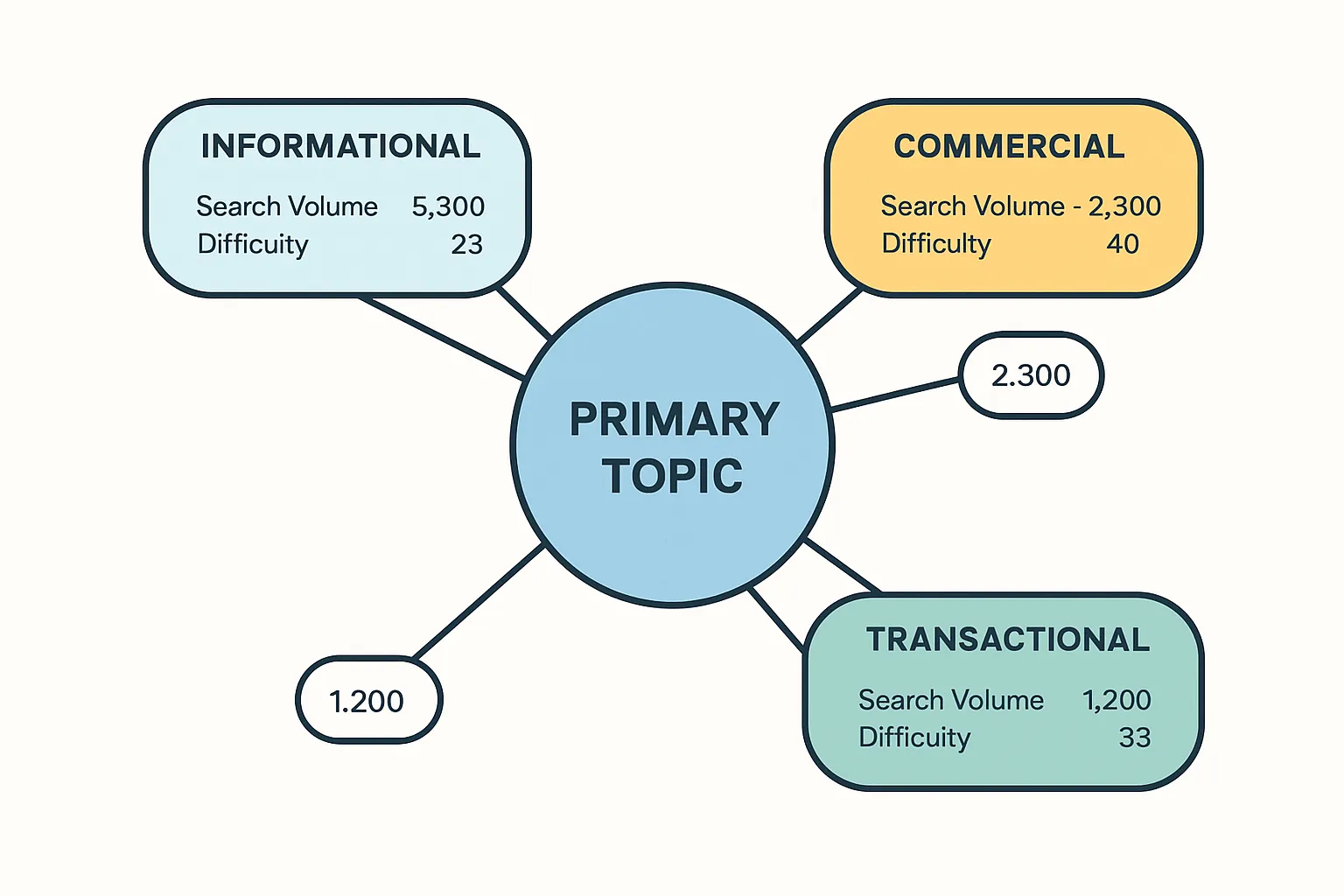
Turn audience problems into keyword‑backed ideas
Start with real problems. Mine support tickets, CRM notes, and sales calls for recurring questions. Lurk in communities (Reddit, Discord, Slack groups, LinkedIn) to capture the exact language your audience uses. Each problem becomes a seed topic for creating blog posts that actually get searched.
Layer keyword research on top:
Intent: identify whether searchers want information, comparison, or to buy now.
Difficulty: gauge ranking competition; pick winnable phrases for early momentum.
Volume: prioritize terms with consistent demand over one‑off spikes.
Parent topics: find umbrella themes that can support multiple posts and pillar pages.
Pro tip: when you write your own blog, match the query’s intent precisely. If the SERP shows how‑to guides, don’t force a product page; deliver the tutorial and earn trust first.
Prioritize with intent and business fit
Turn your list into a plan:
Cluster topics by semantic similarity and map each cluster to a funnel stage:
TOFU: educational guides and definitions that attract broad interest.
MOFU: comparisons, checklists, and frameworks that evaluate solutions.
BOFU: implementation guides, ROI calculators, and case studies tied to your product.
Rank by “Impact x Effort”: potential traffic/revenue vs. difficulty/resources.
Create a publishing cadence: weekly or biweekly slots per cluster to build topical authority and internal link density.
Editorial hygiene:
Write short “search intent notes” inside each brief.
Add 3–5 must‑include subtopics for comprehensive coverage.
Pre‑list internal links to related articles and the pillar page for the cluster.
Where BlogBowl helps
BlogBowl automates the heavy lifting so you can publish a blog consistently:
Automated keyword discovery and clustering highlight high‑intent opportunities, then generate 1‑click brief drafts with outlines, titles, and meta suggestions.
Internal‑link suggestions connect new posts to your pillar pages and related articles, strengthening topic clusters and improving crawlability.
Built‑in scheduling ensures clusters roll out in sequence, while analytics flag refresh opportunities as rankings evolve.
Step 2 - Create a brief that speeds drafting (template included)
What a high‑leverage brief contains
A strong brief replaces guesswork with clarity, so your team moves from idea to publish a blog post quickly and consistently.
Target keyword + variants, search intent, audience, POV
Primary keyword, 3–5 semantically related variants
Intent (informational, commercial, transactional) and the audience’s job-to-be-done
Point of view (e.g., product-led, practitioner-led, data-backed)
Title options, meta description, H2/H3 outline, word count range
3–5 headline options with keyword placement
Meta description (140–160 chars) focused on outcome and intent match
H2/H3 skeleton with notes on coverage depth; word-count range (e.g., 1,500–2,000)
Required internal links, example external citations, schema type (Article/BlogPosting)
Link to pillar pages and related posts to strengthen clusters
2–4 authoritative external sources to support claims
JSON‑LD schema type and fields to include
Image plan (hero + inline), alt‑text direction, CTA placement
Hero concept (what it should convey), 1–3 inline visuals to clarify steps/data
Alt‑text guidance (describe utility, not just appearance)
Primary CTA (newsletter/demo) and secondary CTA (related guide) placements
This level of detail makes creating blog posts faster for authors and ensures consistent blog article writing quality for editors and SEO reviewers.
Brief template (outline)
Use this copy‑and‑go structure to remove friction and speed up blog publishing.
Header
Objective: [What result should this post drive?]
Persona: [Who’s reading? Role, pain, sophistication]
Success metrics: [Primary KPI: organic sessions/lead form starts/etc.]
SEO block
Primary keyword: [KW]
Secondary variants: [KW1, KW2, KW3]
Search intent + SERP notes: [What ranks now? Gaps to exploit]
FAQ opportunities (People Also Ask): [Q1, Q2, Q3]
Word count range: [e.g., 1,800–2,200]
Structure (H2/H3s)
H2: [Topic section] - notes/sources
H3: [Subtopic] - examples/data
H3: [Subtopic] - internal link: [/slug]
H2: [Topic section] - notes/sources
H3: [Subtopic] - include keyword variant: [KW]
Links & citations
Internal links: [Pillar URL], [Related article 1], [Related article 2]
External citations (examples): [Source 1], [Source 2]
Schema: Article/BlogPosting (headline, description, author, date, image)
Assets
Images/video: [Hero concept], [Inline diagram], [Short how‑to clip if applicable]
Pull quotes/data: [Compelling stat or customer quote]
Conversion & UX
Primary CTA: [e.g., Start free trial]
Secondary CTA: [e.g., Download checklist]
Accessibility notes: [Alt‑text themes, heading order, link clarity]
Workflow
Owners: Author [Name], Editor [Name], SEO [Name], Publisher [Name]
Due dates/SLA: Draft [Date], Edit [Date+2d], SEO [Date+3d], Publish [Date+4d]
Approval chain: [RACI roles], final sign‑off [Owner]
Tip: If you write your own blog solo, still use this template - the “owners” line becomes your personal timeline so posts ship on schedule.
Where BlogBowl helps
BlogBowl accelerates this step so you can write your own blog at scale without sacrificing quality.
Auto‑generates SEO‑optimized briefs from your target keywords, clustering related topics and proposing titles, meta descriptions, H2/H3 outlines, and word counts in one click.
Inserts internal‑link suggestions from your existing library to reinforce topic clusters.
Prefills schema fields and accessibility notes (alt‑text prompts, heading order).
Schedules accepted briefs directly to your content calendar with SLAs, owners, and approval steps - so drafting starts fast and blog publishing stays on track.
Step 3 - Drafting: AI + human co‑writing for speed and quality
Guardrails for AI‑assisted drafting
AI should accelerate creating blog posts - not dilute your expertise. Set firm constraints so first drafts are fast, accurate, and on‑brand.
Define tone and audience up‑front
Audience: who they are, what they already know, and what they need next.
Voice presets: confident, practical, zero fluff. Reading level target (Grade 8–10).
House style: tense, Oxford comma preference, capitalization rules, banned phrases.
Enforce structure and word count
Required sections: intro (50–75 words), H2/H3 outline, scannable bullets, examples, CTA.
Word count range and keyword placement rules (title, H1, first 100 words, H2/H3s).
Inject product expertise (avoid generic output)
Include proprietary examples, customer stories, benchmarks, and screenshots/diagrams to anchor credibility.
Call out integrations, constraints, and edge cases from real usage.
Require sources and claims checks
For each claim/stat, require a citation or “verify in edit” tag.
Flag any speculative or unverifiable statements for editor review.
Add compliance notes (if needed)
Disclosures for regulated industries; definitions for terms of art.
Example “system prompt” to standardize AI drafts:
You are a senior content editor for a SaaS blog. Write a draft that’s helpful, reliable, people-first. Audience: SaaS marketers and product teams. Tone: friendly, direct, no fluff. Reading level: Grade 9. Structure: Intro (<=75 words), H2/H3s from the brief, bullets, examples, CTA at end. Must include: primary keyword in H1 and first 100 words; 3 variants in H2/H3s; 2 internal link slots; 2 external citations (mark with [CITE]). Constraints: 1,800–2,100 words; paragraphs <=3 lines each. Add proprietary value: include one customer example and one product-specific tip from the brief. Flag anything you can’t verify with [VERIFY].
### Make it scannable and helpful
Readers skim before they commit. Optimize for fast comprehension and action to improve blog publishing outcomes. - Short paragraphs, descriptive subheads, bullets, visuals, clear CTAs - Keep paragraphs to 2–3 sentences. Lead subheads with a benefit plus the keyword. - Use bullets for steps, checklists, comparisons, and pros/cons. - Add a visual every ~300–400 words (diagram, screenshot, table). - Place a contextual CTA after the first major section and another at the end.
- Address objections early - “This is generic.” Counter with proprietary examples and precise steps. - “Will this work with our stack?” List supported tools/integrations and caveats. - “How long will this take?” Give realistic timelines (e.g., draft in 1–2 days; publish a blog in under a week using the workflow).
- Link to depth, not distraction - Use internal links for related posts and pillar pages to strengthen topic clusters. - Include external citations only where they add credibility (data, definitions, standards). Scannability checklist (quick pass before handoff):
- No paragraph exceeds 3 lines.
- Each H2/H3 promises a specific outcome.
- Bullets start with strong verbs; numbers for sequences.
- Visuals support the text (not decorative) and have alt text guidance.
- Primary CTA is visible above the fold; secondary CTA aligns with intent. ### Where BlogBowl helps
BlogBowl streamlines blog article writing so you can write your own blog faster without sacrificing quality. - Daily SEO‑optimized drafts - AI generates first drafts from your brief with your brand presets (voice, reading level, structure, word count). - Title variants, meta descriptions, and outline are prefilled to match search intent.
- Unique images and embedded media - Auto‑creates on‑brand hero and inline visuals; suggests alt text and captions. - Embeds relevant videos and supports rich media without code.
- Multi‑author collaboration - Invite authors and editors, apply brand presets automatically, and route drafts with role‑based approvals. - Auto internal linking inserts relevant links to pillars and related posts to reinforce topic clusters.
- Built‑in quality gates - Readability, metadata completeness, link and image checks, and schema suggestions run before handoff to editing - so your team moves to approval faster and blog publishing stays on schedule. ## Step 4 - Edit pass, SEO, and on‑page QA (publish‑ready checklist) 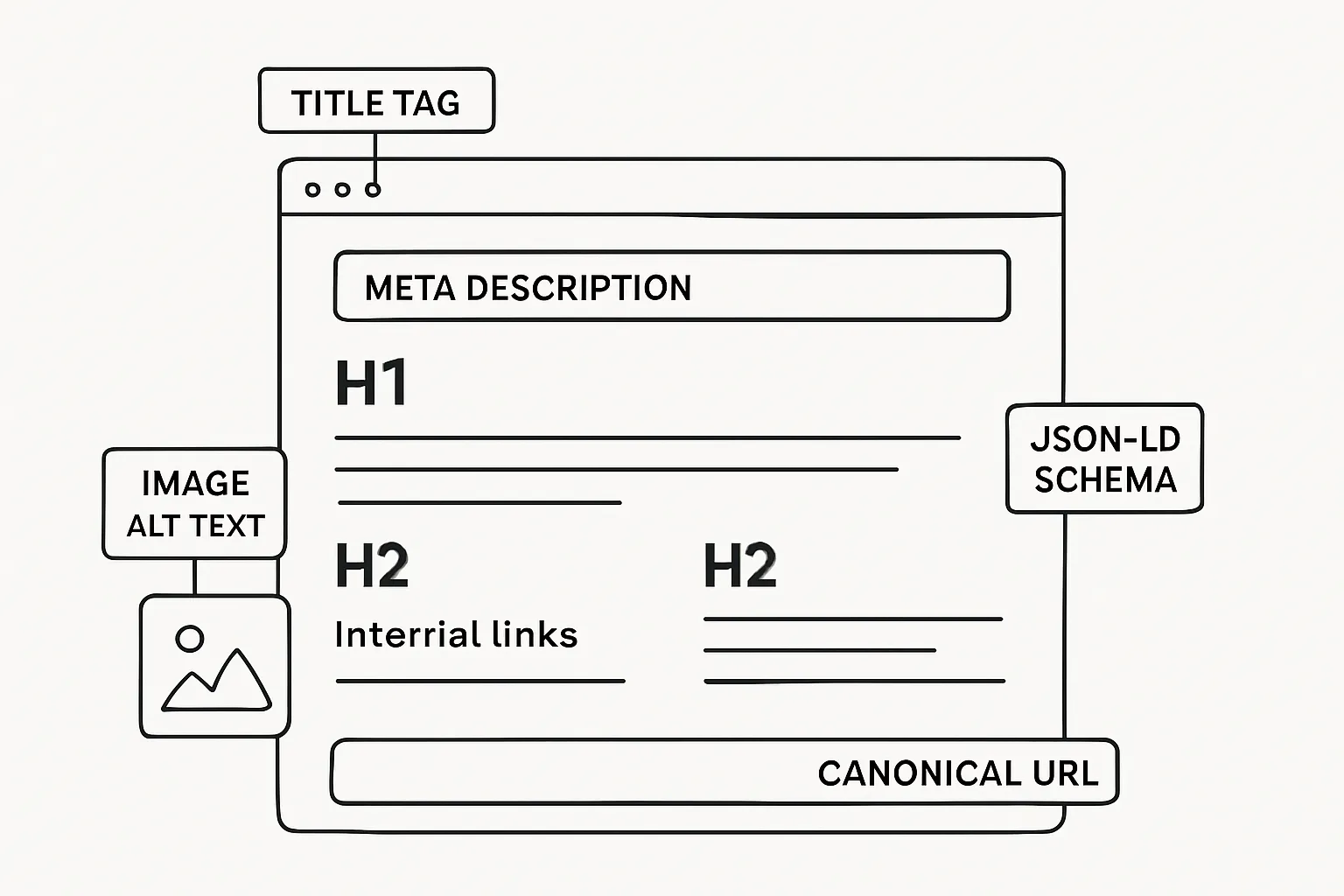 ### Editing for accuracy and brand
- Fact‑check every claim and number; replace weak generalities with precise language.
- Align tone and voice to your style guide; remove redundancies and filler.
- Verify originality: run a duplicate check; replace generic phrasing with product‑specific proof and examples.
- Ensure clarity: short paragraphs, active voice, logical flow, and clear next steps. ### On‑page SEO essentials
- Title/meta: within length (title ~50–60 chars; meta ~140–160), includes primary keyword and benefit.
- Headings: single H1; descriptive H2/H3s that mirror search intent.
- Schema: valid JSON‑LD (BlogPosting/Article) with headline, author, datePublished, image, and description.
- Images: compressed, responsive, descriptive alt text; captions where helpful.
- Links: internal links to pillar/related posts; external links to authoritative sources; consistent nofollow policy for sponsored/UGC where applicable.
- Accessibility: proper heading order, sufficient contrast, meaningful link text, images not conveying info solely by color. ### Pre‑publish QA workflow
- Automated checks: metadata completeness, schema validation, broken link and image resolution, reading grade, and slug/canonical conflicts.
- Manual spot checks: read aloud for flow, confirm screenshots and figures match text, sanity‑check table of contents, test CTAs and UTM parameters.
- Final sign‑off: Editor and SEO reviewer approve; Publisher schedules to go live with post‑publish verification. ### Where BlogBowl helps
- Auto‑injects meta titles/descriptions and JSON‑LD; validates links and image loads.
- Suggests internal links to strengthen clusters; flags missing alt text or long paragraphs.
- Runs accessibility and readability checks; prevents publish if critical gates fail.
- Creates a post‑publish QA task automatically and notifies the channel. | Area | What to check | Tool/Method | Owner | Status |
|---|---|---|---|---|
| Title/meta | Length, keyword, clarity | BlogBowl SEO panel | Editor | [ ] |
| H1/H2 structure | One H1; descriptive H2/H3s | Editor pass + outline compare | Editor | [ ] |
| Schema (BlogPosting) | Valid JSON‑LD, required fields | BlogBowl schema validator | SEO | [ ] |
| Internal links | Pillars, related posts added | Link map + BlogBowl suggestions | SEO | [ ] |
| External links (nofollow policy) | Authority, rel attributes | Link checker + manual scan | SEO | [ ] |
| Images (alt, compression) | Alt text present; <150 KB where possible | Media audit in BlogBowl | Designer | [ ] |
| Readability | Grade level, scannability | Readability score + manual skim | Editor | [ ] |
| Accessibility basics | Headings, contrast, link text | Accessibility checker | Editor | [ ] |
| Canonical/slug | Unique slug; correct canonical | Preflight check | Publisher | [ ] |
| CTA present | Primary/secondary CTAs working | Click test + UTM verify | Editor | [ ] |
| UTM on outbound CTAs | Consistent campaign tags | Link audit | SEO | [ ] |
| Preview on mobile/desktop | Layout, images, table wrap | Live preview across breakpoints | Publisher | [ ] | ## Step 5 - Approvals, scheduling, and CMS handoff 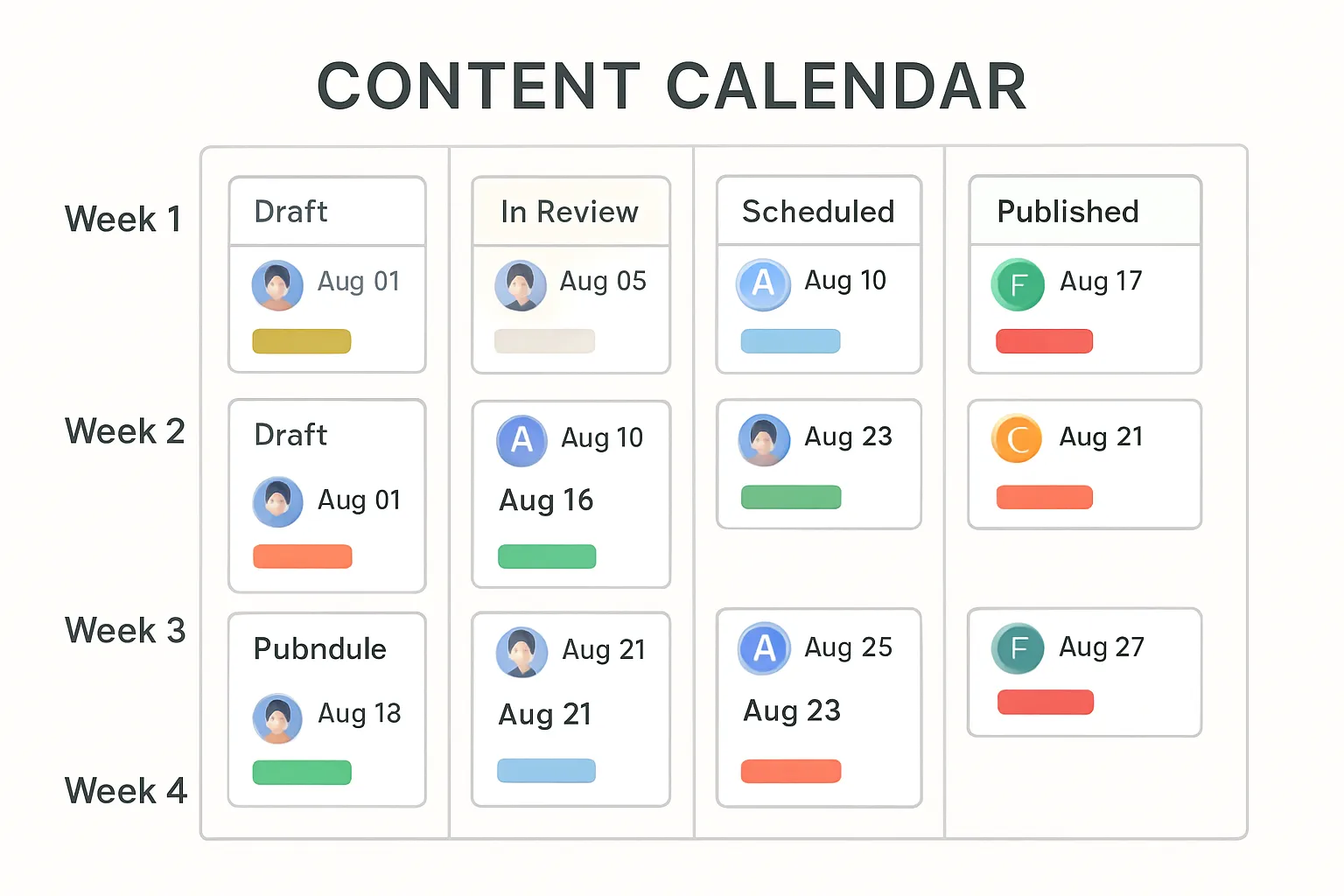 ### Define your approval chain
- Author → Editor → SEO → Legal (if needed) → Publisher
- Set SLAs and escalation rules: - Editor review ≤ 48h; SEO QA ≤ 24h; Legal (regulated content) ≤ 72h; schedule ≤ 24h post‑approval. - If an SLA slips, auto‑notify the next approver and escalate to the channel/manager after 12–24h.
- Capture decisions: log “approve with changes” and comments so the audit trail is complete. ### Scheduling and staging
- Use staging previews for final checks (copy, links, schema, images, accessibility).
- One‑click “approve‑to‑publish” moves posts from staging to scheduled.
- Preflight: canonical/slug conflicts, duplicate titles, category/tags assigned, and image dimensions validated.
- Plan cadence by cluster: assign publish windows (e.g., Tue/Thu 9am local) and reserve promo slots. ### Where BlogBowl helps
- Direct CMS publishing: - Push drafts or schedule posts to WordPress/Webflow (and more) without copying HTML. - Auto‑set canonical, categories/tags, featured image, and JSON‑LD on handoff.
- Scheduling and audit trail: - Set a weekly/biweekly cadence; see statuses at a glance; enforce SLAs with reminders. - Every approval, change, and publish is recorded for compliance and rollback.
- Post‑publish distribution: - Trigger built‑in newsletter sends and generate social snippets with UTM tags. - Notify stakeholders in Slack/email and create a post‑publish QA task automatically. ## Step 6 - Publish, distribute, measure, and refresh 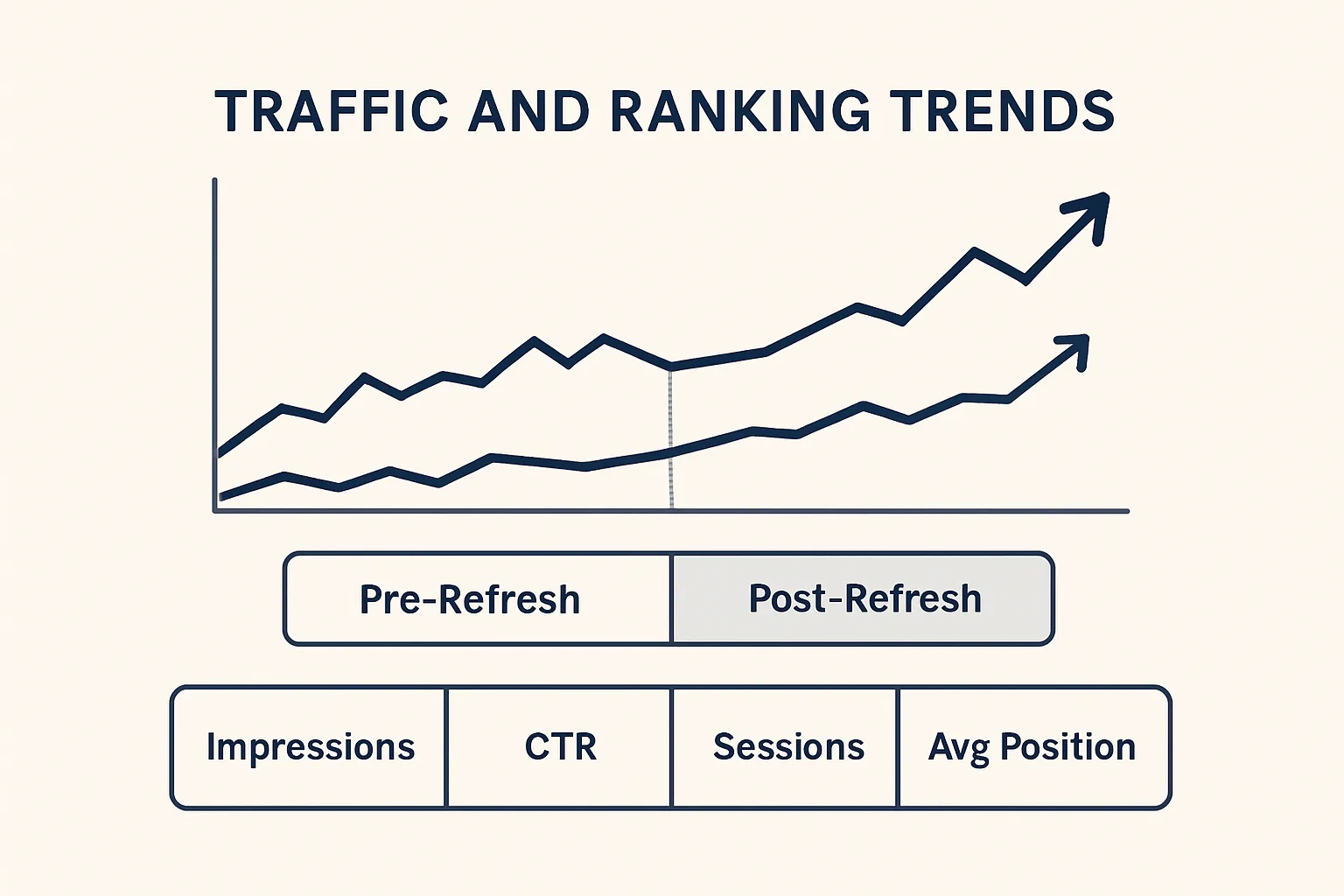 ### Smart distribution
Get your post in front of the right people fast:
- Newsletter send with a tight summary, benefit‑forward subject line, and deep links.
- Social cards per network (image, headline, meta) and scheduled posts across time zones.
- Community posts tailored to house rules (Reddit, Slack groups, LinkedIn communities).
- Partner outreach: alert affiliates or integration partners for co‑promotions and backlinks. ### Measure what matters
Focus on metrics tied to outcomes:
- GA4/Search Console: impressions, CTR, sessions, average position, and assisted conversions.
- Engagement: time on page, scroll depth, and outbound click rate to product or docs.
- Ops metrics: time‑to‑publish, edit cycles, and throughput per author to spot bottlenecks. Decision rules:
- If impressions rise but CTR lags: test new titles/meta and enhance rich results (FAQ, schema).
- If sessions are steady but conversions low: strengthen CTAs, add BOFU internal links, and clarify next steps.
- If rankings plateau: expand coverage, add expert quotes, or build internal links from related posts. ### Historical optimization (refresh loop)
Sustain growth with systematic updates:
- Run 30/60/90‑day scans for traffic/ranking decay, stale examples, or missing internal links.
- Auto‑queue refresh tasks with suggestions: add sections for new subtopics, update stats, improve visuals, or re‑target intent.
- After refresh, resubmit in Search Console and monitor CTR and position deltas for 14–28 days. ### Where BlogBowl helps
- Privacy‑friendly analytics with post‑level KPIs and cohort comparisons.
- Refresh recommendations flagged automatically (decay, intent mismatch, thin sections).
- Automatic internal link updates when new related posts are published.
- One‑click newsletter send and social snippet generation tied to your publishing schedule - so distribution never slips. ## Templates you can steal: briefs, checklists, and SLAs (quick reference) ### Copy‑and‑adapt brief starter
Paste this one‑pager into your doc/PM tool and go from idea to publish a blog post without friction. - Objective: [Primary outcome this post should drive]
- Audience/persona: [Role, pain points, level of expertise]
- POV: [Product‑led, practitioner‑led, data‑backed, etc.]
- Primary keyword + 3–5 variants: [KW, KW1, KW2, KW3, KW4]
- Search intent: [Informational/Commercial/Transactional] - SERP notes: [Top formats, gaps to fill]
- Title options (3–5): [Include primary keyword early]
- Meta description (140–160 chars): [Outcome‑focused]
- Word count range: [e.g., 1,800–2,200]
- Outline (H2/H3s): [Bulleted sections with notes and sources]
- Internal links (3–6): [Pillar + related articles]
- External citations (2–4): [Authoritative sources to support claims]
- Schema: Article/BlogPosting (headline, author, datePublished, image, description)
- Image plan: hero concept + 1–3 inline visuals; alt‑text guidance
- CTAs: Primary [e.g., Start trial], Secondary [e.g., Download checklist]
- Accessibility: heading order, link text clarity, contrast checks
- Acceptance criteria: [What must be true for “ready to publish”]
- Distribution notes: newsletter angle, social snippets, communities to post
- Owners + dates: Author [ ], Editor [ ], SEO [ ], Publisher [ ] Tip: If you write your own blog solo, treat “Owners + dates” as your personal timeline to keep cadence. ### Approval SLAs and reminders
Keep throughput high and reduce handoffs in blog publishing with clear timelines. - Draft due: ≤ 5 business days after brief assignment
- Editor review: ≤ 48 hours
- SEO review/QA: ≤ 24 hours
- Legal/compliance (if needed): ≤ 72 hours
- Schedule/publish after final approval: ≤ 24 hours
- Post‑publish QA: ≤ 2 hours from go‑live Escalation language you can paste into reminders:
- T+24h late (Editor): “Friendly nudge: Edit pass pending. SLA is 48h - can you review by EOD? If blocked, reply with a new ETA.”
- T+24h late (SEO): “SEO QA pending. Please complete metadata/schema/internal links today. Escalating to channel if not updated within 12h.”
- Legal overdue: “Compliance review approaching SLA breach. Please confirm approve/blockers by noon; otherwise escalates to owner + manager.” ### Publishing day runbook
Use this as your final verification to keep creating blog posts consistent and error‑free. - Preflight - H1/H2 structure confirmed; title/meta within limits; canonical and slug unique - Schema (BlogPosting) valid; author/date/image present - Images compressed; alt text added; featured image set - Internal links to pillar/related posts; external links authoritative; rel policies applied - Accessibility basics: heading order, link clarity, color contrast
- Staging review - Desktop/mobile preview checks; table and code block wrap; TOC anchors work - CTA buttons visible and functional; UTM tags on outbound CTAs - Broken link and image‑resolution check passes
- Approve‑to‑publish - Schedule window confirmed (timezone, daypart) - Post‑publish QA owner assigned
- Rollback plan - If something breaks: unpublish or set noindex, restore prior version, fix, republish - Log incident in your PM tool; notify stakeholders; add a follow‑up QA task
- Webhook/alerting notes - Enable success/failure webhooks from CMS; route to #content‑ops - Auto‑verify schema and images post‑publish; log GA4/Search Console snapshot ### Where BlogBowl helps
- One‑click templates: briefs, SLAs, and publish‑day runbooks preloaded in your workspace so every post follows the same playbook.
- Automated reminders: SLA timers and escalations fire in Slack/email to keep work moving.
- QA guardrails: preflight checks for metadata, schema, links, images, and accessibility before anything goes live.
- Distribution on rails: newsletter and social snippets generated automatically post‑publish.
- Audit trail: every decision, change, and publish recorded for compliance and fast rollback - so blog article writing scales without chaos. ## Conclusion: Ship faster, rank higher - start your workflow in BlogBowl ### Why start now
Consistent blog publishing compounds results. A repeatable workflow means you publish a blog on schedule, reduce errors, and build topical authority that drives steady organic traffic. With automation handling the busywork, you can focus on creating blog posts that are genuinely helpful - improving both rankings and conversions. ### Next steps
- Spin up a BlogBowl blog in under 60 seconds, import your archive, and activate daily AI drafts plus automated SEO and internal linking.
- Connect your domain, invite your team, and schedule your first month of posts with clear SLAs.
- Use built‑in analytics and refresh recommendations to keep winning pages fresh - turn blog article writing into a reliable growth engine.
- Write your own blog with confidence: brand presets, unique images, and one‑click publishing ensure quality and speed. ### Call to action
Try BlogBowl free at https://www.blogbowl.io - focus on creating while BlogBowl handles hosting, fast templates, analytics, newsletters, and automation.