


Free blog vs your own domain: TL;DR and who each is for
What this guide covers
Clear, unbiased breakdown of free blogging platforms vs using your own domain (self-hosted or managed SaaS like BlogBowl)
How each option impacts cost, control, SEO, branding, and growth
A simple decision framework to know when to start free and when to upgrade
Whether you want to create a blog free to test ideas (including a free Google blog) or launch an own blog website on a custom domain, this section gives you the fast answers.
Quick recommendations by goal
Hobby/testing ideas: start free; upgrade if traction appears
Building a brand/business (SaaS, startup, pro creator): start with your own domain
Non-technical teams who want speed + SEO without maintenance: own domain via a managed solution (e.g., BlogBowl)
Comparison at a glance (free vs own domain)
Option | Setup | Costs (now/24 months) | Control | SEO | Branding | Monetization | Performance | Portability/Migration Risk |
|---|---|---|---|---|---|---|---|---|
Free Blog (e.g., platform subdomain) | Fastest: create your free blog in minutes; no domain needed | Now: $0; 24 mo: $0–$200+ (custom domain, add-ons) | Limited features; platform policies and potential ads | Basic; subdomain limits authority; restricted technical SEO | Platform-branded URL; fewer design options; less credibility | Often limited or restricted; platform may run its own ads | Shared resources; variable speed; fewer optimization controls | Higher risk of lock-in; exports vary; platform TOS changes can impact site |
Own Domain (self-hosted + managed SaaS) | Self-hosted: 1–3 hours; Managed SaaS (e.g., BlogBowl): launch in under a minute | Now: domain + plan; 24 mo: predictable subscription/hosting + domain | Full ownership and flexibility; custom features/themes | Strong; custom domain + full on-page controls; advanced SEO setups | Professional custom domain; cohesive brand control | Full options: ads, affiliates, products, memberships, subscriptions | Optimized stack possible; managed SaaS delivers fast, stable performance | Low risk; you own the domain/content and can move hosts/providers |
Neutral explainer video on hosted vs. self-hosted:
How to use this article
Skim the table now; jump to sections most relevant to your stage (e.g., SEO, monetization, migration). If you want to make your blog for free to validate an idea, start there; if you’re ready to build on your own domain, dive into the setup and growth sections next.
What ‘free blog’ and ‘your own domain’ really mean (with examples)
What is a free blog?
Hosted on a third-party platform with a subdomain (e.g., yourname.blogspot.com)
Typical examples: Blogger (Google), WordPress.com Free
Fast start, limited control, potential content/policy constraints
What is your own domain?
You own your domain (yourname.com) and point it to your blog
Two main routes:
Self-hosted CMS (e.g., WordPress.org) on your own hosting
Managed SaaS (e.g., BlogBowl) that hosts and maintains the stack for you
Representative platforms we’ll reference
Free: Blogger, WordPress.com
Own domain: WordPress.org (self-hosted), BlogBowl (managed SaaS)
Where BlogBowl fits
Own-domain, managed SaaS purpose-built for SEO and automated content ops (ideal for SaaS/startups, product teams)
Costs: the real price now vs 24 months (free isn’t always free)
Free platform costs
$0 to start; extras often add up: custom domain mapping, design upgrades, removing platform ads, extra storage, advanced features
If you want to create a blog free to validate an idea, it’s perfect - just note that common upgrades (like a custom domain for a free Google blog) can make “free” cost more over time
Own domain costs (self-hosted)
Domain: typically $10–$15/year
Hosting: entry-level plans often $5–$15/month; costs scale with traffic
Optional: premium themes/plugins, managed backups/security
Great for an own blog website when you want flexibility and control
Own domain costs (managed SaaS)
Domain: same ($10–$15/year)
Subscription includes hosting, maintenance, security, performance, analytics/features; predictable cost curve
Ideal if you want to “create my blog for free” speed but with pro-grade SEO and fewer technical tasks - managed solutions like BlogBowl bundle what you’d otherwise piece together
Two-year total cost of ownership (TCO)
Side-by-side estimates for free (with typical add-ons), self-hosted, and managed SaaS
“Free” often turns pricier than a basic own-domain setup once you add a custom domain, remove ads, and expand storage
Plan Type | Setup | Monthly baseline | Add-ons | Total 12 months | Total 24 months | Notes on limits/overages |
|---|---|---|---|---|---|---|
Free (base + common upgrades) | Instant; $0 | $0 | Common upgrades: domain $10–15/yr, domain mapping $0–24/yr, remove ads $4–10/mo, extra storage $2–5/mo, premium theme $20–60 (one-time) | $0 (pure free) to ~$120–$300 with common upgrades | ~$0 (pure free) to ~$240–$600 with common upgrades | Platform ads may display on your site; limited customization and SEO controls; overages or paid tiers for storage/features |
Self-hosted WordPress.org (domain + hosting + optional theme/plugin) | 1–3 hours; $0 setup fee + domain $10–15/yr | $5–15 (hosting) | Domain $10–15/yr, optional theme/plugins $0–$200 (one-time), backups/security $0–$10/mo | ~${70–$515} depending on choices | ~${140–$830} depending on choices | You control performance and SEO; costs scale with traffic and premium tools you choose |
Managed SaaS (domain + subscription) | Minutes; $0 setup fee + domain $10–15/yr | $15–49 (subscription) | Domain $10–15/yr; optional send/usage tiers may apply | ~$190–$603 | ~$380–$1,206 | Predictable bundle (hosting, security, performance, analytics, features); usage tiers for email/storage may apply |
Ownership, portability, and risk tolerance
Who owns what?
Free platforms: you own your content, but not the platform or the domain. Your blog lives on a subdomain (e.g., yourname.platform.com) and is governed by the provider’s Terms of Service. Policies, pricing tiers, or features can change, and the provider controls ads, monetization limits, and sometimes access to advanced SEO settings. If you create a blog free to test an idea (including a free Google blog), understand that your address and feature set are ultimately the platform’s.
Own domain: you control your domain (yourname.com) and where it points. Whether you run a self-hosted CMS or a managed SaaS like BlogBowl, you can change hosts, tools, designs, and caching/CDN setups without changing your public address. This is the foundation for a durable own blog website.
Portability & lock-in
Free: portability varies widely. Some platforms offer export tools (often XML/JSON for posts and pages), but media, comments, and design elements may not transfer cleanly. 301 redirects from a platform subdomain to a new custom domain are often limited or unavailable, risking SEO equity loss. If you plan to make your blog for free first, consider mapping a custom domain early to reduce future disruption.
Own domain: you manage DNS, so you can move between hosts/providers while keeping URLs stable. You can implement 301 redirects at the server or application level, preserve slug structures, and maintain sitemaps/canonicals for SEO continuity. Content exports are typically straightforward (database and media backups for self-hosted; structured exports for managed SaaS), making future moves less painful.
Practical portability checklist:
Use a custom domain from day one (even on a free plan, if allowed).
Standardize clean permalink structures (avoid date-heavy or opaque URLs if future migration is likely).
Keep a canonical image library (so media URLs can be remapped or redirected).
Maintain a central doc with URL mappings for 301 redirects during migration.
Validate your RSS feeds and sitemaps before and after any move.
Content safety & continuity
Backups: on free platforms, schedule periodic exports of posts/pages and download original media. On self-hosted, automate daily database and weekly full-site backups to offsite storage. On managed SaaS, confirm export options and retention policies, and keep a local archive of your key content.
Export options: verify that you can export posts, pages, categories/tags, and ideally media and comments. For newsletters, ensure you can export subscriber lists (consent data included). For analytics, keep your raw data accessible (UTMs, page-level stats).
Policy changes: free platforms may add ads, limit features, or update ToS. Mitigate with:
Custom domain mapping to preserve brand continuity.
Regular exports so you can migrate quickly if needed.
A content calendar and migration playbook (redirect plan, QA checklist, and search console updates).
Risk profile by platform type:
Free: moderate risk (lock-in, limited redirects, policy changes). Best for hobby/testing, “create my blog for free” scenarios, or a short validation sprint.
Own domain (self-hosted): low-to-moderate risk (you own the stack; uptime/security is your responsibility). Strong control if you maintain backups and updates.
Own domain (managed SaaS): low risk for non-technical teams - hosting, performance, and security are handled while you retain domain control and can switch providers later if needed.
Bottom line: If you’re serious about brand, SEO, and compounding growth, owning your domain reduces lock-in and preserves portability. Free is fine to validate an idea, but plan early for ownership - your future self (and your search visibility) will thank you.
SEO, speed, and discoverability (Google + LLMs)
Domain-level authority and link equity
Custom domains compound authority. Every backlink you earn points to your brand, not a platform’s subdomain, so equity persists even if you redesign or switch providers.
Clean, consistent URL structures (on your own domain) help search engines crawl, consolidate signals, and avoid dilution across multiple subdomains.
For SaaS and startups, a branded domain builds trust signals that influence click-through rates - critical for competitive SERPs.
Technical SEO & performance
Full control enables best-practice fundamentals:
Metadata and structured data: set precise titles, meta descriptions, schema, canonical tags.
Sitemaps and indexing: manage XML sitemaps, robots directives, and log-file insights.
Internal linking: build topic clusters, use contextual anchors, and control crawl paths.
Caching/CDN: deploy server/page caching, image optimization, and a global CDN to improve Core Web Vitals.
Why speed matters:
Faster pages improve rankings, user satisfaction, and conversion rates - especially on mobile.
Lower TTFB, optimized images, lean JavaScript, and preloading key assets are measurable advantages of owning the stack (self-hosted) or using a performance-focused managed SaaS.
"53% of mobile users abandon a site if it takes longer than three seconds to load." - Source
Content operations at scale
Scale requires process and structure:
Topic clusters that map to user journeys (awareness → solution → product).
Systematic internal linking to surface related content and distribute PageRank.
Programmatic updates (refreshing titles, adding FAQs, updating screenshots) to keep posts competitive.
How BlogBowl helps:
Automates keyword research, internal linking, and on-page SEO so each post ships fully optimized.
Generates unique images and embeds relevant media for richer, stickier pages.
Publishes on a fast, SEO-optimized template with built-in analytics and newsletter tools - ideal when you want to create a blog free of maintenance overhead while keeping pro-grade results.
LLM visibility (beyond Google)
AI assistants and answer engines favor:
Clean information architecture with descriptive headings, concise answers, and schema-enhanced entities.
Fast-loading pages with accessible HTML (less render-blocking JS) for reliable parsing.
Topical authority: coherent clusters, consistent terminology, and credible outbound citations.
Owning your domain lets you iterate structure and speed without platform constraints, helping your content surface not only in Google but also in LLM responses where clarity, authority, and load time increasingly matter.
Branding and trust signals
Custom domain = instant credibility
A custom domain signals professionalism at a glance. Prospects are far more likely to trust and remember yourname.com than a platform subdomain. That credibility pays off in higher click-through rates from search and social, better email deliverability, and more referral shares.
Memorability and brand recall improve with a consistent URL and naming convention across your website, blog, and documentation. This is hard to achieve on a free platform where your address highlights the host’s brand more than yours.
Matching email (you@yourdomain.com) reinforces legitimacy in outreach, PR, and partnerships - something you don’t get if you “create a blog for free on Google” and stay on a subdomain.
If you plan to build an own blog website for a product-led business, start on your brand domain from day one so every link you earn compounds your authority.
Practical tips:
Pick a domain that’s short, pronounceable, and matches your product/company name.
Standardize brand handles and naming across your channels (blog, docs, newsletter, social).
Configure branded sender domains for email (SPF/DKIM/DMARC) to protect deliverability.
Design freedom and consistency
Free platform themes are great to make your blog for free and validate ideas quickly, but they limit how deeply you can implement a brand system (color tokens, typography scales, spacing, iconography, component patterns).
On your own domain (self-hosted or managed SaaS), you can implement:
Consistent brand styles across the blog, landing pages, docs, and changelog.
Branded Open Graph/Twitter cards for on-brand link previews.
Cohesive navigation, footers, and trust marks (security badges, certifications, press).
Consistency drives recognition, direct traffic, and repeat visits. It’s much easier to deliver this when you control the stack - or use a managed SaaS like BlogBowl that provides fast, SEO-optimized templates and easy customization without code.
Practical tips:
Define a simple design system (colors, fonts, button styles, spacing) and apply it sitewide.
Set default OG images and structured metadata so every post shares beautifully by default.
Align your blog’s header/footer with your main site to avoid “two-site” fatigue for users.
Multi-property branding for products
As you grow, you may need multiple branded surfaces:
Separate blogs for distinct product lines or audience segments.
Regional blogs (e.g., en-us vs en-gb) with localized editorial calendars.
Product-specific spaces (changelog, knowledge base, developer hub).
Structure choices:
Subfolders (example.com/blog) centralize authority and often simplify analytics.
Subdomains (blog.example.com) are fine when you need technical separation or regional infrastructure.
BlogBowl supports multiple blogs under one roof, making it easy for product teams to maintain consistent branding while tailoring content for each audience or region - all with shared analytics and automated SEO best practices.
Monetization, integrations, and data ownership
Monetization on free platforms
Free platforms are great to create a blog free and test content-market fit, but monetization is often constrained. Some providers run their own ads on your pages, limit ad placements, or restrict certain affiliate/sponsorship disclosures and scripts.
You can usually add simple affiliate links and basic sponsorships, but premium ad networks, native ad widgets, and advanced placements may be unavailable.
Paywalls, memberships, and checkout flows are typically limited or locked behind higher-tier upgrades - turning “blog free” into a paid plan once you need real revenue features.
Practical takeaways:
If you create a blog for free on Google or similar, expect to hit ceilings once you need more than basic ads/affiliates.
Read the ToS on ads, sponsored content, and tracking scripts before you scale.
Own domain advantages
Full monetization stack: Run display/programmatic ads, affiliates, sponsored posts, gated guides, courses, memberships, and digital goods - plus product-led motions (free trials, demos, self-serve checkout).
Conversion tracking: Install pixels (e.g., for retargeting and lookalikes), custom events, server-side tagging, and funnel reporting. Attribute content → signup → revenue with your own tracking plan.
CRM and email capture: Own your forms, CTAs, and landing pages. Sync subscribers and leads to your CRM and marketing automation for nurturing and lifecycle campaigns.
For SaaS and startups, your own blog website on a custom domain aligns content with pipeline: route readers into trials, waitlists, or demos without platform restrictions.
Integrations & extensibility
Self-hosted (WordPress.org): Thousands of plugins and mature APIs for ecommerce, course platforms, memberships, price tables, schema, lead capture, and analytics. You can add webhooks, integrate with your data warehouse, and fine-tune SEO at a granular level.
Managed SaaS (BlogBowl): Get the speed and control without maintenance. BlogBowl bundles:
Fast, SEO-optimized templates that improve ad viewability and conversion rates.
Built-in newsletter tools and subscriber CTAs to grow your list (no external setup).
Privacy-friendly analytics, automatic internal linking, and on-page optimization to increase the ROI of every article.
Easy custom domain integration so your monetization and tracking sit under your brand from day one.
Data access & export
Your revenue scales with the data you can see and act on:
Own analytics: Keep page-level metrics, UTM parameters, and cohort views accessible long-term. With free platforms, analytics can be limited or siloed; with your own domain you decide what to track and where to store it.
Subscriber ownership: Export your email list, including consent and segmentation fields, whenever you need. Portability is critical if you change ESPs or CRMs.
Content portability: Keep clean exports (posts, pages, media, redirects) so you can migrate without losing SEO equity or historical performance.
Bottom line: Whether you create your free blog to validate an idea or jump straight to your own domain, prioritize data control. BlogBowl makes data ownership simpler - your content, your subscribers, your analytics - while removing the technical burden that usually comes with a highly integrated stack.
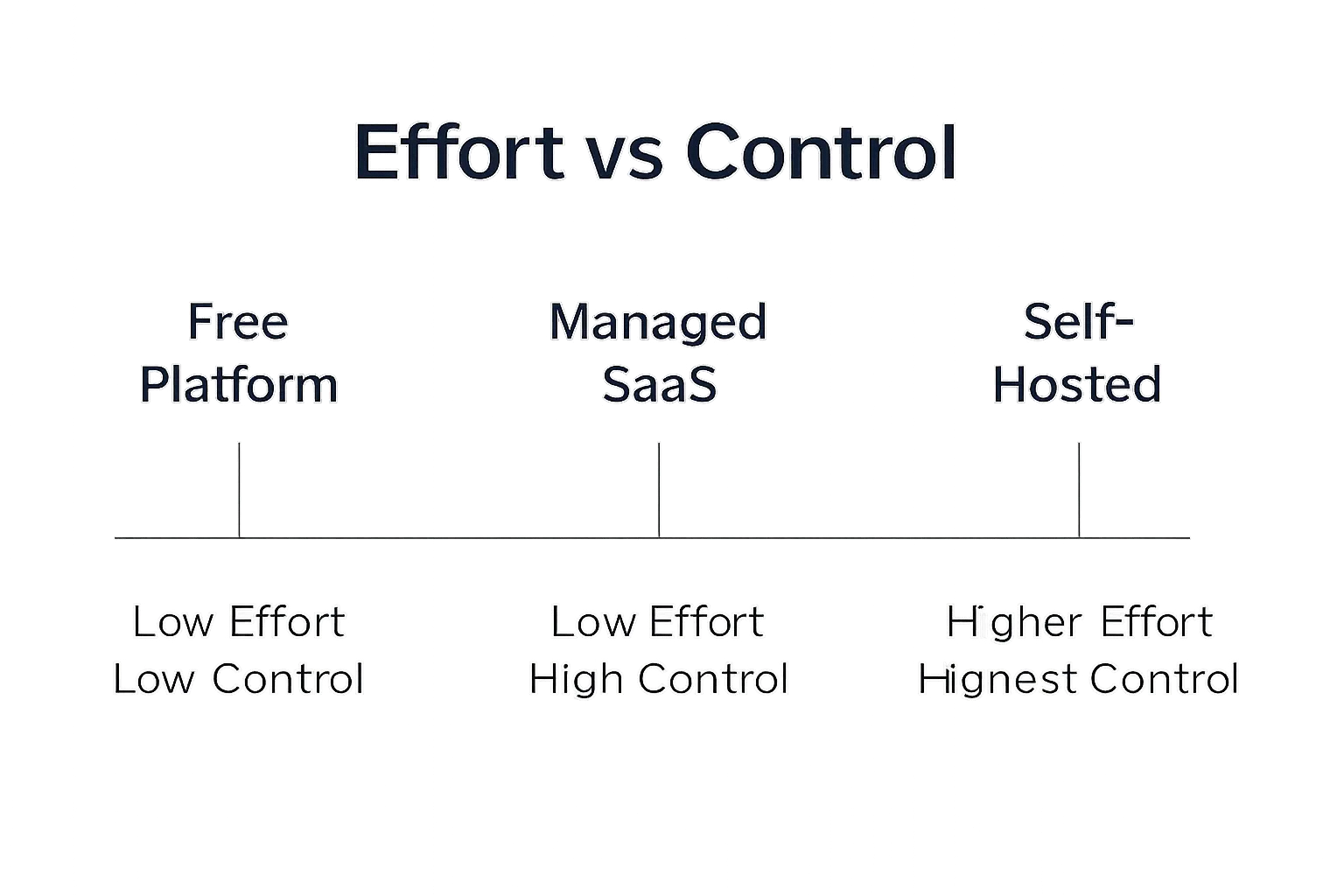
Setup and maintenance: effort vs control
Free platforms
Fast setup and minimal maintenance. Ideal to create your free blog and validate ideas quickly.
Trade-off: limited customization, restricted plugins/integrations, and less control over performance and SEO.
Self-hosted WordPress.org
Setup steps: purchase a domain, connect DNS, choose hosting, enable SSL, install WordPress, select a theme, add essential plugins, configure SEO/caching, and launch.
Ongoing: routine core/theme/plugin updates, automated backups, uptime monitoring, security hardening (WAF, login protection), image/CDN optimization, and periodic performance tuning.
Managed SaaS (e.g., BlogBowl)
Launch in minutes with automated updates, backups, security, analytics, and performance handled for you.
Focus on content and growth while the platform manages templates, speed, and technical SEO. Perfect for non-technical teams that want control and velocity without maintenance overhead.
"WordPress powers 43.2% of all websites globally." - Source
Ecosystem size and support
A large ecosystem means abundant tutorials, forums, agencies, and vendor support - critical when you scale content ops, automate SEO, or integrate CRM and analytics.
Self-hosted WordPress has the broadest plugin/theme marketplace and community. Managed SaaS like BlogBowl provides vendor support and opinionated best practices out of the box, reducing configuration debt.
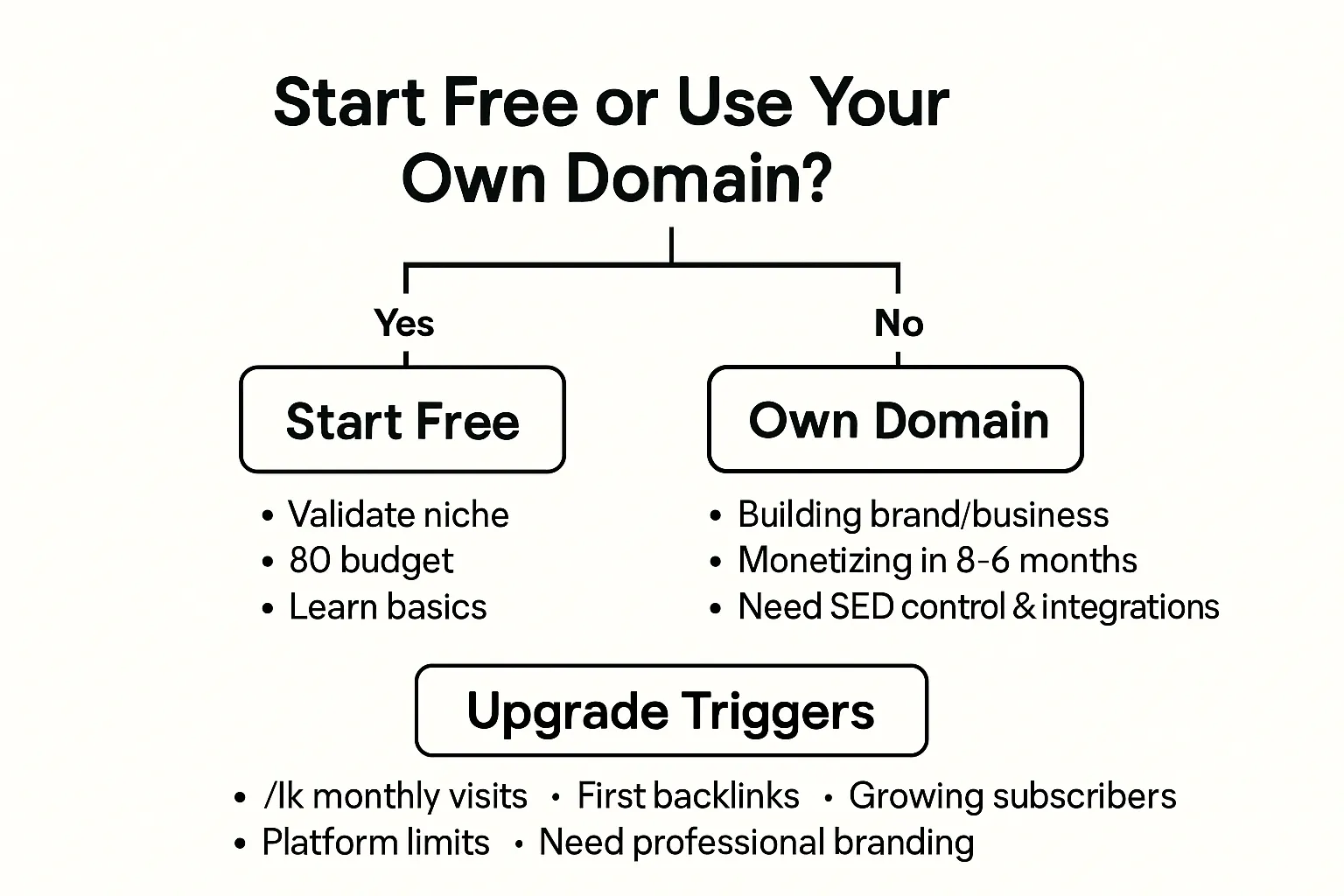
Create a blog free first? Decision framework (and signs it’s time to upgrade)
Start free if...
You’re validating a niche or personal interest and don’t need custom integrations/monetization yet
Budget is near-zero and you want to learn the basics quickly
Start with your own domain if...
You’re building a brand/business (SaaS, startup, pro creator) or plan to monetize within 3–6 months
You need SEO control, branding, and integrations from day one
Upgrade triggers
Consistent traffic (>1k monthly), first backlinks, subscriber growth, or partnership interest
Platform limitations blocking features/SEO; desire for professional branding
Fast upgrade path (without losing SEO)
Secure domain, set up destination (self-hosted or BlogBowl)
Content export/import; set up categories, slugs, and internal links
Configure 301 redirects and verify sitemaps
Test analytics/events; soft launch, then switch DNS
Where BlogBowl fits as an upgrade
Keep your domain, gain SEO automation and analytics; minimal downtime, no-code setup
Which should you choose? Final verdict
If blogging is a hobby or experiment
A free platform is a great way to create your free blog, learn the basics, and test a niche. You can make your blog for free and ship your first posts in minutes - even create a blog for free on Google if that’s familiar.
Set simple upgrade rules now: if you cross ~1k monthly visits, start earning backlinks, or get subscriber/partner interest, plan a move to your own blog website to preserve and compound momentum.
If you’re a SaaS, startup, or aim to monetize
Choose your own domain from day one. You’ll build durable SEO equity, cohesive branding, and full control over integrations and monetization.
Prefer a managed SaaS if you want speed without maintenance. BlogBowl gives you lightning-fast, SEO‑optimized templates, built‑in analytics and newsletters, and automated content ops (keyword research, internal linking, media embeds) so your team focuses on growth, not hosting and updates.
Bottom line
Free is perfect to start fast and validate; your own domain wins for real growth. The earlier you own your domain, the more authority and brand recall you compound.
If you expect to monetize or scale content, skip the future migration headache: launch on your domain with a managed solution like BlogBowl and accelerate traffic, trust, and conversions from day one.
Product URLs (for scraping reference)
Note
These are representative platforms referenced in the comparison.
We do not list our own product here per instructions.