
![Format of a Blog Post: The Anatomy of High‑Performing Content [2025]](https://blog.blogbowl.app/rails/active_storage/blobs/redirect/eyJfcmFpbHMiOnsiZGF0YSI6OTczLCJwdXIiOiJibG9iX2lkIn19--d7a345b1d9c1e0dc41f63913a4cc77ed50f5ebc4/Format%20of%20a%20Blog%20Post-%20The%20Anatomy%20of%20High%E2%80%91Performing%20Content%20%5B2025%5D-cover.webp)

Why Blog Format Matters in 2025 (Attention, Scannability, and Conversions)
The new reality of attention
Millions of posts compete daily; format is your edge.
Readers skim first, then decide whether to stay.
"On average, 8 out of 10 people will read headline copy, but only 2 out of 10 will read the rest." - Source
In 2025, the format of a blog is a competitive advantage. Audiences move fast, skimming before committing. Your blog content structure - how you stage the hook, chunk insights, and surface takeaways - determines whether a reader bounces or engages. At BlogBowl, we’ve seen that fixing format before copy edits often delivers the quickest lift in dwell time and conversions.
Why format > layout
Great design matters, but writing a blog structure that guides the eye matters more. Think of structure as the “reading UX” of a blog article:
Purposeful H1/H2/H3 flow that answers intent in a logical order
A clickable Table of Contents (TOC) for instant navigation
Skimmable paragraphs (2–4 lines), bullets, and numbered steps
Callouts, quotes, and checklists that highlight key ideas
Clear, consistent CTAs placed where momentum peaks
When your blog writing is structured this way, comprehension rises, cognitive load drops, and readers progress naturally through the page. The result: higher dwell time, lower bounce rate, and more people reaching your CTA.
Built for humans, friendly to search and LLMs
People-first formatting signals quality to both Google and AI search tools. Clean headings, descriptive subheads, and consistent patterns make your posts easier to parse, helping:
Eligibility for rich snippets, sitelinks, and better SERP presentation
More accurate extraction by AI assistants (LLMs) that surface answers
Stronger internal linking context for topic authority
In short: format that respects readers also improves machine understanding - so your article and blog can win in both traditional search and AI-driven discovery.
Outcomes you can expect
Implementing a modern blog content structure reliably moves the right needles:
Higher CTR from stronger titles and rich snippets
Longer session duration from scannable sections
Better conversion from strategically placed CTAs
How BlogBowl helps: Our SEO-optimized templates enforce best-practice H2/H3 flow, auto-generate TOCs, insert smart internal links, and place CTAs where they convert - so you can focus on content while we handle the structure that ranks and sells.
The Anatomy Blueprint: A Proven Blog Content Structure
The 9-part high-performing blog format
H1: Promise-driven, keyword-informed title (<= 60–70 characters).
Hook intro: Empathy + problem framing + preview.
TOC: Anchor-linked, auto-generated for long posts.
H2/H3 body: Logical chapters, 2–4 sentence paragraphs, lists, callouts.
Media: 1–4 purposeful visuals (charts/concepts), 1 embedded video max.
Proof: Data points, quotes, examples; cite original sources.
UX: Mobile-first spacing, font sizes, and fast-loading assets.
Conversion: Primary CTA + supporting CTAs in-context.
SEO & Schema: Descriptive subheads, internal/external links, JSON-LD.
"Users read on the web by scanning, not by reading every word." - Source Supports skimmable structure.
This blueprint optimizes the format of a blog for both humans and algorithms. It gives readers a predictable, low-friction path through a blog article while giving search engines and LLMs clean signals via headings, internal links, and schema. If you’re writing a blog structure from scratch, start with this 9-part map before drafting paragraphs.
Where each element lives on the page
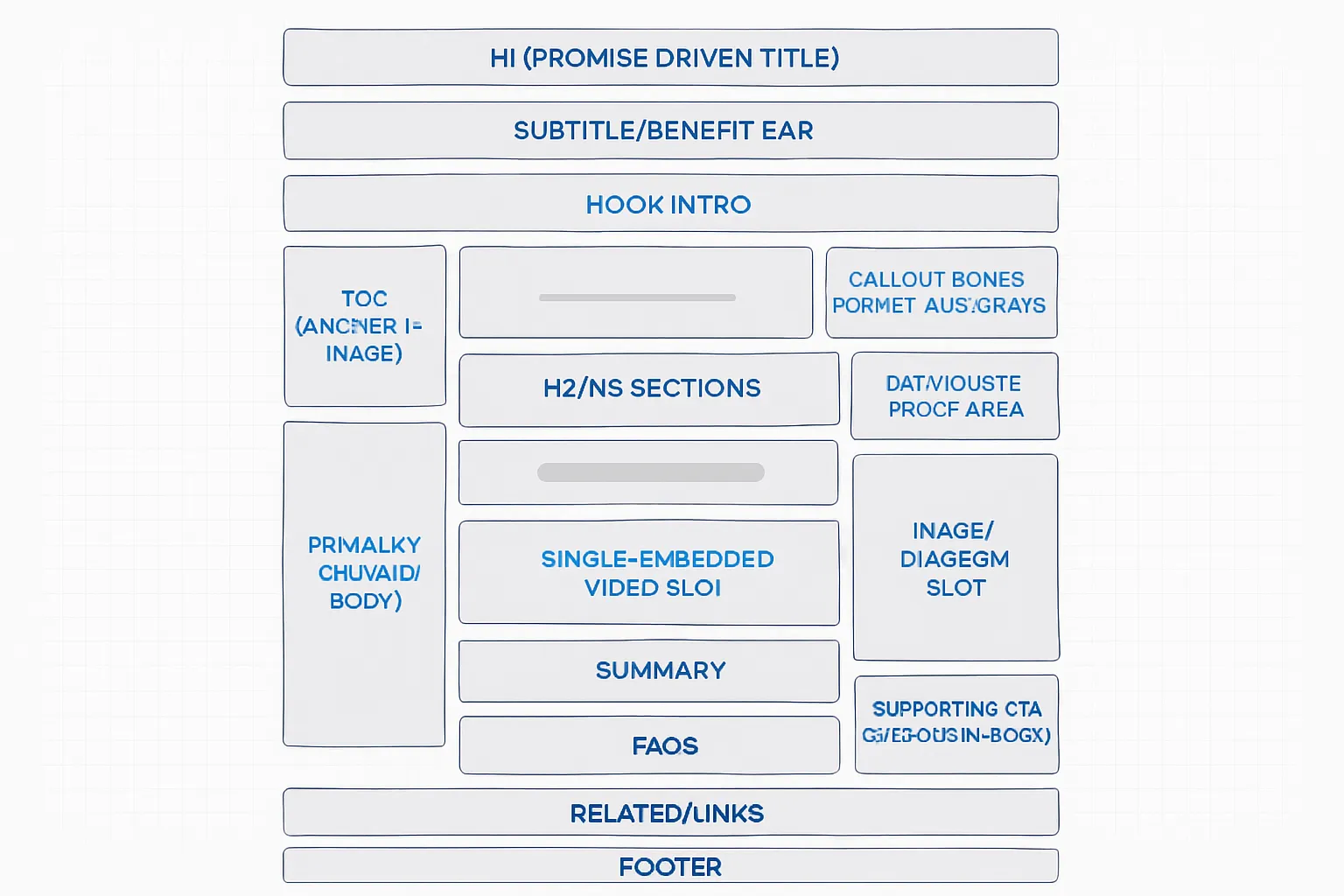
Above the fold: H1, subtitle, social proof/benefit, hero context.
Early body: Hook, TOC, short value promise.
Mid-body: Teaching sections with visuals and examples.
Late body: Summary, FAQs, CTA, related links.
Use this layout to streamline blog content structure so readers can scan, decide, and act. It’s the difference between an article and blog post that “looks right” and one that performs.
BlogBowl advantage
Auto-generated outlines aligned to your keywords and intent.
Smart internal linking and SEO-friendly H2/H3 scaffolding.
One-click AI visuals and clean embedded media placement.
Built-in TOC, callouts, and CTA blocks for higher conversions.
Scheduled publishing and schema injection - no code required.
With BlogBowl, a blog writing workflow becomes plug-and-play: define intent, select the blueprint, and publish a structured post that ranks and converts.
Headlines, Hooks, and Introductions That Win Clicks
Headlines that earn the click
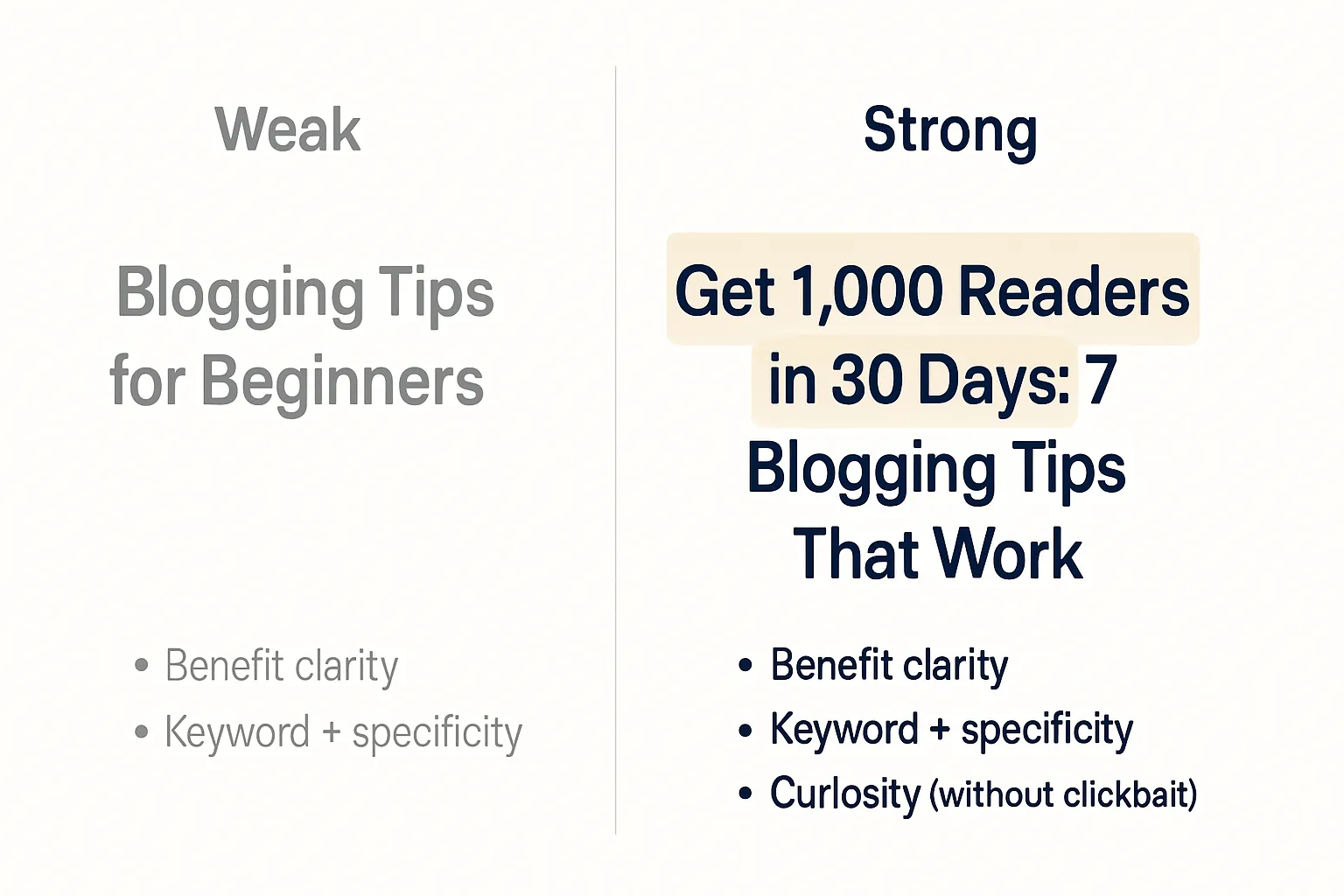
Balance curiosity + keyword clarity (avoid clickbait).
Front-load benefits; emphasize first and last 3 words.
Use numbers, specificity, and outcome language.
Examples:
Weak: “Blogging tips for beginners”
Strong: “Get 1,000 Readers in 30 Days: 7 Blogging Tips That Work”
Why it works: The strong version promises a measurable outcome, keeps the core keyword intact, and adds specificity without hype.
Hooking the reader in 3–5 sentences
Empathize with the reader’s problem.
Promise a concrete outcome.
Tease the process or framework (don’t give it all away).
Template:
You want X, but Y keeps happening. In this post, you’ll learn Z so you can achieve RESULT. Here’s the simple framework we’ll use.
Example:
You’re publishing consistently, but traffic barely moves. In this guide, you’ll learn a 9-part format that doubles time-on-page and boosts sign-ups. We’ll walk through headlines, structure, and CTAs you can copy today.
Metadata that supports the title
Page title vs. H1 nuances; keep both aligned.
Meta description that previews value and CTA.
Best practices:
Page title: Include primary keyword + benefit; keep under ~60 characters to avoid truncation.
H1: Mirror the promise; you can add a clarifier after a colon.
Meta description: 150–160 characters that preview the outcome and include a soft CTA, e.g., “Learn the 9-part format to increase dwell time and conversions - examples included.”
H2/H3 Architecture, TOC, and Skimmability
Build a logical outline before writing
H2 = big ideas; H3 = subpoints. Keep one idea per section to prevent cognitive overload and make your blog content structure easy to follow.
Draft a living outline first. Map H2s as the core chapters, then add H3s beneath each to support the main point. Adjust as you research so you avoid tangents and duplication.
Run the “scan test.” If a reader only reads your H2/H3s, they should still grasp the argument and flow of the article and blog piece.
Keep depth shallow. Avoid H4+ unless absolutely necessary. If you need deeper nesting, your section likely deserves its own H2.
Use consistent sequencing across H2s (e.g., Problem → Why it matters → Steps → Example → Pitfalls → Summary/CTA). This predictable pattern improves the format of a blog for both new and returning readers.
Anchor intent to keywords. Let search intent guide your H2 labels so writing a blog structure remains aligned with how users search (e.g., “Steps,” “Checklist,” “Template,” “Examples”).
Make content skimmable by design
Keep paragraphs to 2–4 sentences with generous white space. Aim for 60–80 characters per line for comfortable reading.
Use bullets and numbered steps to surface key actions and outcomes. Lists help your blog article pass the “glance test.”
Insert pull-quotes for emphasis and to restate the core payoff in plain language.
Standardize callouts so readers learn your cues:
Pro Tip: a fast-win tactic or workflow shortcut.
Watch out: common mistake or risk to avoid.
Example: a concrete use case or mini case study.
Key Takeaway: the one-sentence summary that anchors the section.
Bold sparingly - only to highlight pivotal terms or outcomes.
Add visuals where they clarify a concept or process. Place images directly after the paragraph they support and caption them for quick context.
Maintain rhythm: insert an H3 or callout roughly every 150–300 words to reset attention without breaking flow.
TOC best practices
Auto-generate the TOC from your H2/H3 hierarchy. Place it after the hook, before the first H2, so readers can jump to what they need.
Make it collapsible on mobile and sticky on desktop (optional) for easy navigation through long-form content.
Keep anchors short, descriptive, and lowercase with hyphens (e.g., “/post#setup-checklist” rather than “/post#Section-2-The-Complete-Setup-Checklist”).
Avoid duplicate headings that generate identical anchors. If necessary, add a brief qualifier (e.g., “Setup (Beginner)” vs. “Setup (Advanced)”).
Exclude the H1 from the TOC; use H2/H3 only to maintain a clean navigation list.
Respect sticky headers: add a scroll offset so anchored jumps don’t hide the section title.
Pro move with BlogBowl: Our templates auto-generate a mobile-friendly TOC from your H2/H3s, manage anchor hygiene, and add offset for sticky navs - so your writing a blog structure stays clean while readers (and search engines) get a crystal-clear map.
Mobile-First UX, Speed, and Readability
"~60% of global web traffic comes from mobile devices." - Source
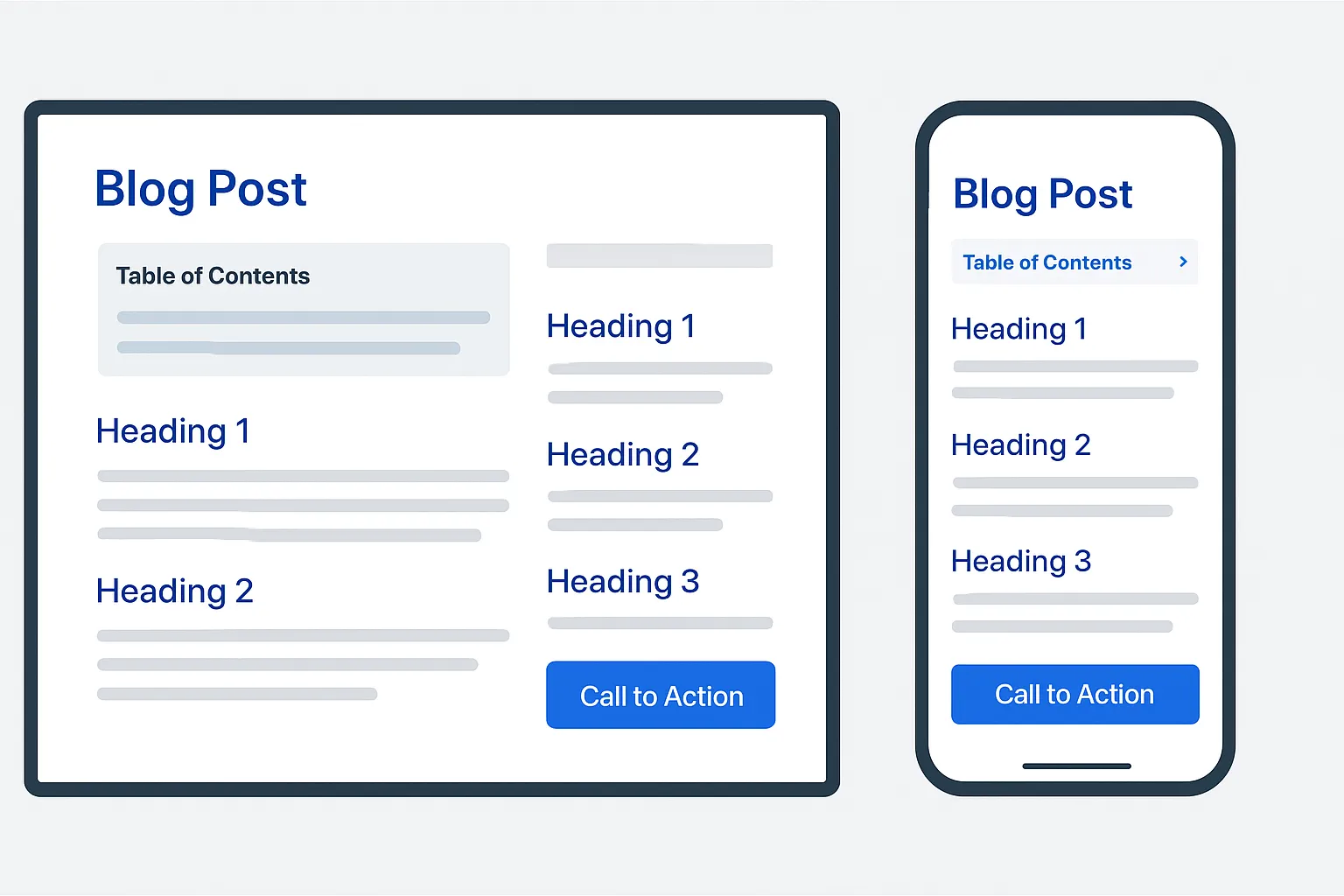
Readability defaults
Base font 16–18px, line height 1.6–1.8, line length 55–75 chars.
Strong color contrast; avoid justified text; left-align body copy.
Use 20–24px for H2s and 18–20px for H3s on mobile to preserve hierarchy without crowding.
Cap paragraph width on desktop (60–70ch) to prevent long scan lines.
Performance that protects rankings and conversions
Optimize images with next-gen formats (AVIF/WebP), responsive srcset sizes, and compression; lazy-load below-the-fold assets.
Limit embeds and third-party widgets; replace heavy iframes with static previews that hydrate on interaction.
Preconnect/preload critical domains (fonts, CDN) and defer non-essential scripts; inline critical CSS and serve the rest asynchronously.
Minimize layout shift (CLS) by setting width/height on images and reserving space for ads/embeds.
Cache aggressively at the edge; use HTTP/2 or HTTP/3 and keep TTFB low to protect Core Web Vitals.
Accessibility that broadens reach
Provide descriptive alt text; use semantic headings (one H1 per page, logical H2/H3 order).
Make CTAs accessible: ≥44px tap targets, clear focus states, and descriptive button labels (“Start free trial,” not “Click here”).
Don’t convey meaning by color alone - pair with labels/icons and sufficient contrast (WCAG AA/AAA where possible).
Ensure keyboard navigation works across menus, TOC, accordions, and modals; trap focus properly and enable Esc to close overlays.
Respect motion sensitivity: reduce parallax/auto-animations and provide prefers-reduced-motion fallbacks.
With BlogBowl, mobile-first defaults are built into every template - fast-loading assets, accessible components, and smart TOC/CTA behaviors - so your posts read beautifully on phones and protect rankings and conversions by design.
On-Page SEO Essentials: Links, Metadata, and Schema
Internal and external linking that builds authority
Link to contextually relevant posts with descriptive, intent-matching anchor text (e.g., “blog content structure template” vs. “click here”). This clarifies relationships for readers and crawlers, boosting topical authority across your article and blog.
Use outbound links to authoritative sources to support claims, cite data, and deepen trust. When appropriate, open external links in a new tab to preserve session flow.
Prioritize internal links to cornerstone pieces and related how-tos. This improves crawl paths, distributes PageRank, and strengthens the format of a blog designed for topic depth.
Place links where readers have the highest intent to explore (after a concept, in checklists, or at the end of sections).
Metadata and media optimization
Slugs: keep short, descriptive, lowercase with hyphens (e.g., /blog-format-blueprint).
Titles: benefit + primary keyword within ~60 characters; keep H1 closely aligned to page title to signal relevance.
Meta descriptions: preview the value and include a soft CTA (“Learn the structure that improves dwell time and conversions.”).
Images: use meaningful file names (blog-structure-wireframe.webp); write alt text that states what the image shows and why it’s there (“Wireframe of H2/H3 layout to improve skimmability”), supporting accessible blog writing.
Open Graph/Twitter Cards: set og:title, og:description, og:image for better social CTR and consistent brand presentation.
Structured data that earns rich results
"The structured data helps Google understand your pages better and highlight your content in search features..." - Source
Article: baseline for most informational posts; eligible for enhanced results and clearer entity understanding.
FAQPage: add only for actual Q&A content readers can see; can qualify for FAQ-rich results.
HowTo: use on step-based tutorials with images/steps; follow the official guidelines to avoid ineligibility.
Organization/Person at the site level: clarify your brand entity for knowledge panels and publisher attribution.
BlogBowl advantage
Automatic internal linking and keyword suggestions that align with your writing a blog structure.
One-click Open Graph and Twitter Card setup for consistent social previews.
JSON-LD injection for Article, FAQPage, and HowTo where applicable - no code required.
Fast, SEO-optimized templates that keep your metadata, links, and schema clean and consistent across every blog article.
json { "@context": "https://schema.org", "@graph": [ { "@type": "Article", "@id": "https://www.example.com/your-url#article", "headline": "YOUR_HEADLINE", "description": "YOUR_DESCRIPTION_SUMMARIZING_VALUE", "author": { "@type": "Person", "name": "YOUR_AUTHOR_NAME" }, "datePublished": "2025-01-15T09:00:00Z", "dateModified": "2025-01-15T09:00:00Z", "image": [ "https://www.example.com/path/your-feature-image.webp" ], "mainEntityOfPage": { "@type": "WebPage", "@id": "https://www.example.com/your-url" }, "publisher": { "@type": "Organization", "name": "YOUR_ORGANIZATION_NAME", "logo": { "@type": "ImageObject", "url": "https://www.example.com/path/logo.png" } } }, { "@type": "FAQPage", "@id": "https://www.example.com/your-url#faq", "mainEntity": [ { "@type": "Question", "name": "What is the best format of a blog post for SEO?", "acceptedAnswer": { "@type": "Answer", "text": "Use a clear H2/H3 hierarchy, a mobile-friendly TOC, concise paragraphs, and internal links to related content. Add Article/FAQPage schema where appropriate." } }, { "@type": "Question", "name": "Should I add structured data to every post?", "acceptedAnswer": { "@type": "Answer", "text": "Add Article schema to informational posts by default. Use FAQPage or HowTo only if the page visibly contains FAQs or step-by-step instructions that meet Google’s guidelines." } } ] } ] }
## Reusable Blog Post Outlines by Format (Plug-and-Play) ### Post types covered
- How-to tutorial, Listicle, Case study, Comparison/versus, Product update/changelog. ### How to tailor for intent
- Informational intent: lead with education, place primary CTA later (e.g., “Download template”).
- Commercial intent: surface social proof early and insert a mid-body CTA near decision points.
- Use trust assets (logos, ratings, brief testimonials) near comparisons and case studies to reduce friction. ### Editorial notes
- Insert examples and original visuals for information gain.
- Add FAQs at the end for search and LLM coverage. 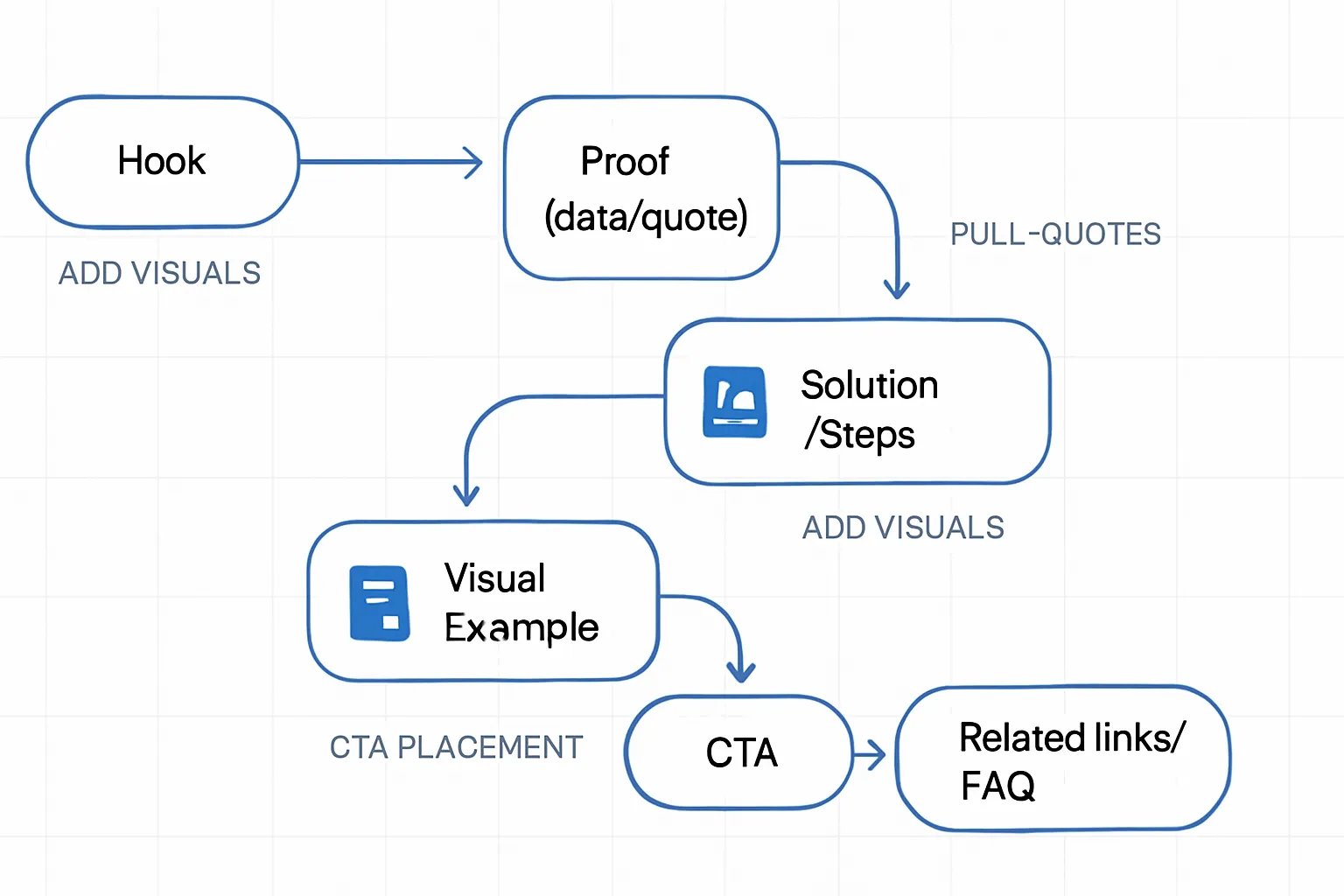 | Post Type | H2/H3 Skeleton | Ideal Media | Where to Put CTA | Schema to Consider |
| --- | --- | --- | --- | --- |
| How-to Tutorial | H2: Overview → H2: Prerequisites → H2: Step-by-step (H3: Step 1/2/3) → H2: Common mistakes → H2: Checklist/Template → H2: FAQs | Process screenshots, short demo GIF, single embed video, checklist graphic | Mid-body after first 2–3 steps; end with “Get the template” | HowTo, Article, FAQPage |
| Listicle | H2: Intro + criteria → H2: List items (H3: Item 1–10) → H2: How we ranked → H2: Summary → H2: FAQs | Icons, comparative mini-tables, product images | Above the fold soft CTA; mid-body contextual CTAs after every 3–4 items | Article, FAQPage |
| Case Study | H2: Background → H2: Problem → H2: Approach → H2: Results (metrics) → H2: Lessons learned → H2: FAQs | Before/after charts, timeline graphic, quote pullouts | Early “See the demo,” late “Talk to sales” near results | Article, Review (if applicable), FAQPage |
| Comparison/Versus | H2: Who this is for → H2: TL;DR verdict → H2: Side-by-side table → H2: Deep dive (H3: Feature A/B/C) → H2: Use cases → H2: FAQs | Feature matrix table, annotated screenshots, toggle-able pros/cons | Early verdict CTA; secondary CTAs within use cases | Product, Article, FAQPage |
| Product Update/Changelog | H2: What’s new → H2: Why it matters → H2: How to use it (H3: Steps) → H2: Known issues → H2: What’s next → H2: FAQs | Short GIFs, UI snippets with callouts, micro-diagrams | Inline “Try it now” near “How to use”; end with “Subscribe to updates” | Article, SoftwareApplication (site-level), FAQPage | With BlogBowl, you can save these outlines as reusable templates, pre-populated with TOC, callouts, and CTA blocks. Choose the format, add your insights and visuals, and publish a structured post that ranks and converts. ## Publishing Workflow, Checklist, and Metrics That Matter ### Pre-publish checklist (quality and compliance)
- Confirm intent match: the headline, H2/H3 flow, and examples align with the searcher’s job to be done.
- Validate outline integrity: each H2 covers one big idea; H3s advance the argument without duplication.
- Subhead clarity: descriptive, keyword-informed, and scannable (2–4 sentence paragraphs beneath).
- Link audit: add contextual internal links to cornerstone pieces; cite original sources with outbound links.
- Media hygiene: descriptive file names, alt text (what/why), compressed AVIF/WebP, captions where helpful.
- Metadata: benefit-led title tag, aligned H1, persuasive meta description with a soft CTA; short, descriptive slug.
- Schema: Article by default; FAQ/HowTo when applicable; verify with a validator.
- Accessibility: color contrast, focus states, keyboard navigation, meaningful link/button labels.
- Performance: lazy-load below-the-fold assets, defer non-critical scripts, preconnect critical domains.
- CTAs: primary CTA positioned at the natural decision point; supporting CTAs in context.
- Proofreading: grammar, voice consistency, fact check, and plagiarism scan. ### Post-publish distribution
- Update internal links from older relevant posts to the new piece to pass authority and traffic.
- Publish a short newsletter blurb with the core benefit and a single CTA.
- Ship social snippets (thread, carousel, or quote cards) tailored per platform.
- Partner outreach: notify sources you cited and partners likely to share or link.
- Repurpose into a 60–90s short video, a multi-slide carousel, and 2–3 email course snippets. ### Update cadence
- Quarterly review of top-performing posts for freshness: add new data, clarify steps, and prune outdated bits.
- Append FAQs based on comments, support tickets, and Search Console queries.
- Reassess search intent and cannibalization; consolidate or redirect if needed. ### Metrics to track
- CTR: title/meta effectiveness in SERP.
- Scroll depth and time on page: skimmability and engagement.
- Conversions: sign-ups, demo requests, trials, or template downloads.
- Backlinks and referring domains: authority growth.
- Supporting: Core Web Vitals, impressions, average position, internal link clicks. ### BlogBowl advantage
- One-click publish across fast, SEO-optimized templates.
- Automatic internal link suggestions and keyword prompts.
- Built-in newsletter and social snippets generator.
- Analytics for engagement, conversions, and content ROI.
- Scheduled refreshes via AI with schema, links, and CTAs updated automatically. | Step | What to Check | KPI Impact | BlogBowl Feature |
| --- | --- | --- | --- |
| Intent match | Does the post fulfill the searcher’s job to be done? | Higher CTR, lower bounce | AI outline aligned to keyword intent |
| Title/meta | Benefit-led title, aligned H1; persuasive meta | CTR uplift | Title/meta assistant with SERP preview |
| H2/H3 architecture | Logical, non-duplicative H2/H3 flow | Scroll depth, time on page | Outline builder with structure scoring |
| TOC | Auto-generated, mobile-collapsible | Faster navigation | Built-in TOC with anchor hygiene |
| Internal links (in-post) | Contextual links to pillars and related posts | Pages/session, conversions | Smart internal linking suggestions |
| Outbound citations | Original sources with descriptive anchors | Trust, backlinks earned | Citation helper with link checker |
| Images | AVIF/WebP, alt text, captions, sizes set | LCP, accessibility | Auto-compress + alt text prompts |
| Performance | Lazy-load, defer, preconnect, minify | Core Web Vitals | Speed optimizer + preconnect defaults |
| Slug & OG cards | Short slug; consistent Open Graph/Twitter | Social CTR | One-click OG/Twitter card setup |
| Schema | Article + FAQ/HowTo when applicable | Rich results | Automatic JSON-LD injection |
| Accessibility | Contrast, focus, keyboard, labels | Usability, compliance | Accessible components baked-in |
| CTAs | Primary + supporting CTAs at decision points | Conversions | Drag-and-drop CTA blocks with A/B |
| Proofreading | Grammar, reading ease, brand voice | Professionalism | AI copy polish + style checker |
| Internal link updates (network) | Add links from legacy posts to the new one | Discoverability | Backfill linker across archives |
| Newsletter send | Short blurb with single CTA | Return visits, conversions | Built-in newsletter composer |
| Social snippets | Platform-specific hooks and creatives | Referral traffic | Social snippet generator + scheduler |
| Partner outreach | Notify sources/partners for shares/links | Backlinks, reach | Outreach list + templated emails |
| Repurpose | Short video, carousel, email lessons | Multi-channel reach | Auto repurpose to video/carousel/email |
| Monitor & iterate | CTR, depth, conversions, backlinks | Continuous improvement | Analytics + AI refresh scheduling | Ship with a process, not guesswork. With BlogBowl, your format of a blog post, metadata, schema, and internal links are handled end-to-end - so you can focus on insights that move readers to act. ## FAQs About Blog Format and Structure ### How long should a blog post be to rank and convert?
- Prioritize depth that matches intent, not a fixed word count. For informational “how-to” queries, 1,200–2,000 words often allows complete coverage; for comparison or commercial intent, clarity with decisive takeaways may outperform length.
- Use a clear outline (H2/H3 flow) so readers can find answers fast; this improves dwell time and conversions even in longer pieces.
- Aim for information gain: original examples, checklists, and screenshots that competitors lack. That’s what lifts an article and blog beyond average.
- Tip: If your H2s can’t be skimmed to tell the whole story, refine the blog content structure before drafting. ### How many images and embeds should I use?
- Add 1–4 purposeful visuals per post - charts, diagrams, or step screenshots that clarify concepts. Place them directly after the paragraph they support.
- Limit to one embedded video per post to avoid bloat; summarize key points beneath it for readers who prefer text.
- Optimize every asset: AVIF/WebP, compression, proper dimensions, lazy-load below the fold, and descriptive alt text. This protects speed and accessibility.
- Rule of thumb: Insert a visual every 300–600 words if it meaningfully improves understanding. ### Where should I place CTAs?
- Place a primary CTA right after the main problem/solution moment - when motivation is highest.
- Include a mid-body CTA in long posts (after 50–60% scroll) and a final CTA at the end. Ensure each CTA aligns with intent (e.g., “Get the template,” “Start free trial,” “Book a demo”).
- Keep CTAs context-specific. For comparison posts, position CTAs near verdicts; for tutorials, after steps or checklists.
- Make CTAs accessible: descriptive labels, 44px tap targets, and clear visual hierarchy. ### How do I optimize for AI-driven search?
- Use clean H2/H3 architecture with concise, self-contained sections that answer one question at a time. This helps both Google and LLMs extract accurate responses.
- Add a brief FAQs block addressing common follow-ups; write tight, entity-rich answers (include product names, concepts, and metrics).
- Use descriptive anchors and internal links to your cornerstone resources to reinforce topic authority.
- Write people-first summaries at the end of key sections. Short, declarative sentences are more likely to be surfaced in AI answers. Need a faster way to implement a high-performing format of a blog? BlogBowl enforces a proven writing a blog structure - auto-TOC, smart internal linking, alt text prompts, and CTA placement - so every blog article you publish is scannable, fast, and conversion-ready. ## Conclusion: Launch a High-Performing Blog with BlogBowl ### Bring the format to life, fast
- Use this anatomy to ship content that ranks, resonates, and converts.
- Apply a clear H2/H3 flow, skimmable sections, purposeful media, and strategic CTAs to elevate the format of a blog from “readable” to “conversion-ready.”
- Keep your blog content structure consistent across every blog article so readers (and search engines) instantly understand your value.
- Treat each piece as a system: headline → hook → teaching → proof → action. This is the blueprint for writing a blog structure that wins both traffic and trust. ### Why BlogBowl
- Launch a professional, SEO-optimized blog in under 60 seconds.
- Daily AI-written drafts, auto-publishing, keyword research, internal linking, and AI visuals/video embeds.
- Unlimited blogs, built-in newsletter, privacy-friendly analytics, custom domains, and automatic backlink exchange.
- Automated schema, Open Graph, and internal link suggestions keep every article and blog aligned to best practices without extra effort.
- Fast, mobile-first templates ensure speed, accessibility, and readability out of the box - no coding required. ### Next step
- Start your BlogBowl trial to publish your next high-performing post on autopilot: https://www.blogbowl.io