
![Blog vs Website: Key Differences and When You Need Both [2025]](https://blog.blogbowl.app/rails/active_storage/blobs/redirect/eyJfcmFpbHMiOnsiZGF0YSI6OTQ1LCJwdXIiOiJibG9iX2lkIn19--a58836f3cfc1e8f945fc4b119c315151ee55d53e/Blog%20vs%20Website-%20Key%20Differences%20and%20When%20You%20Need%20Both%20%5B2025%5D-cover.webp)

Intro: Blog vs Website in 2025 (Read This Before You Build)
If you’re deciding between a website and blog in 2025, here’s the simple truth: you rarely need to choose. Think of a website as your brand’s permanent home (product, pricing, trust signals, conversions), and a blog as the engine that brings qualified visitors to that home through search, social, and email. Together, they compound growth.
What changed in 2025? Search is now split between Google and AI-powered assistants. That means your content needs clean structure, fast performance, and a consistent content cadence to surface in both. The winning setup is still a website with a blog in a subfolder - yourdomain.com/blog - because it strengthens topical authority, keeps UX simple, and consolidates link equity. If you’re exploring a website for a blog or comparing a website and blog as separate entities, this guide will show you exactly how to structure both - and how to launch fast with BlogBowl’s AI automation.
"Companies that maintain blogs produce an average of 67% more leads per month than those that don't." - HubSpot (2015)
TL;DR
A website = your permanent hub for brand, product/service, and conversion.
A blog = your always-on content engine for discoverability, education, and trust.
Best choice in 2025: use both. Put your blog in a subfolder (yourdomain.com/blog) for strongest SEO and UX unless you have clear technical reasons not to.
Who this guide is for
SaaS, startups, product teams, creators, and marketers who want a simple, scalable plan.
What you’ll learn
Clear definitions and anatomy of a website vs blog (with examples).
Placement models: subfolder vs subdomain vs separate domain - what to choose and why.
How to structure navigation, categories, tags, and subfolders for SEO and UX.
Real “website blogs examples” and URL blueprints.
A fast path to launch both with BlogBowl (no code, AI automation).
What Is a Website? What Is a Blog? (Definitions + Anatomy)
What is a website?
Purpose-built hub with persistent pages: Home, Product/Services, Pricing, About, Contact, Legal.
Designed for clarity, trust, and conversion (demos, trials, quotes, bookings).
Typical architecture: Header nav + footer nav; supporting hubs (Docs, Changelog, Help Center, Blog).
What is a blog?
A regularly updated section of a site (or standalone) that publishes posts in reverse chronological order.
Core elements: Posts, categories, tags, archives, author bios, RSS/newsletter.
"a website that contains online personal reflections, comments, and often hyperlinks, videos, and photographs provided by the writer." - Source
“About blog website”: how blogs fit inside websites
Most commonly, the blog lives within the main website (e.g., yourdomain.com/blog) to align brand, UX, and SEO.
A blog can also run on a subdomain or separate domain, but consolidating your website and blog often strengthens authority and simplifies analytics.
Put simply: all blogs are websites, but not all websites are blogs.
Website and blog: pages vs posts (the anatomy)
Pages: evergreen, hierarchical, and typically undated (e.g., Home, Pricing, About). Ideal for conversion, positioning, and core navigation.
Posts: time-stamped articles organized by categories/tags. Ideal for search demand coverage, internal linking, and timely updates.
Together, this “website blog” setup lets you convert on pages and attract/educate via posts.
Quick glossary for beginners
Categories: Broad themes that group related posts (e.g., SEO, Product Updates).
Tags: Specific topics or attributes within a category (e.g., “keyword research,” “release v3.2”).
Subfolders: URL structure segments that organize content (e.g., /blog/, /help/, /changelog/).
Slug: The last part of a URL that identifies a page or post (e.g., /blog/website-and-blog-differences/).
Archive: Auto-generated lists of posts by date, category, tag, or author.
ToFu/MoFu/BoFu: Funnel stages - Top (awareness), Middle (consideration), Bottom (decision). Blogs excel at ToFu/MoFu; core website pages target BoFu.
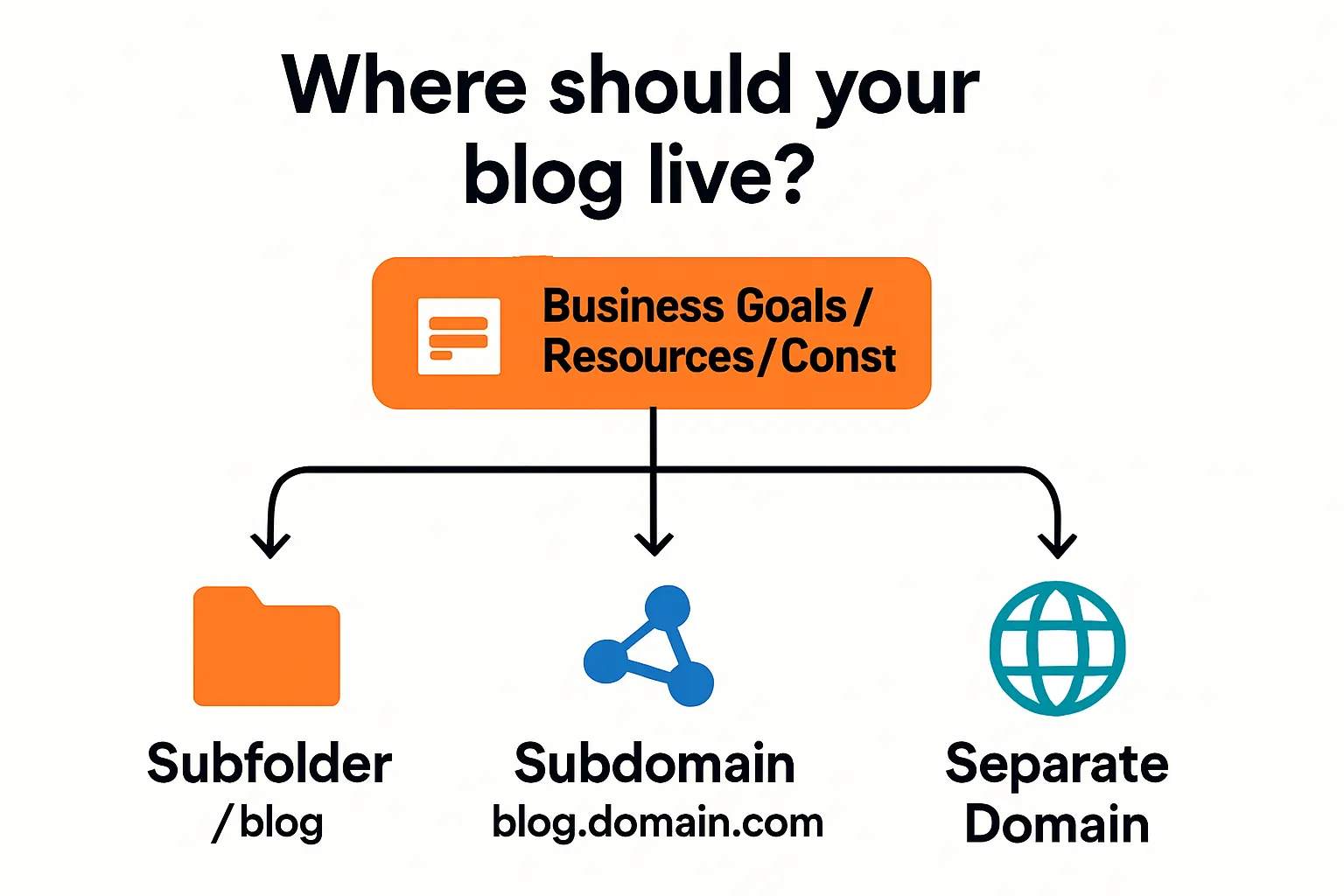
Where Should Your Blog Live? Subfolder vs Subdomain vs Separate Site
The 2025 default: use a subfolder (yourdomain.com/blog)
Strongest for consolidating domain authority and link equity.
Simplifies analytics, governance, and internal linking (single property).
Consistent UX and branding; easier to scale navigation and breadcrumbs.
When a subdomain (blog.yourdomain.com) makes sense
Organizational separation: different teams/tools, independent deployment cycles.
Legacy or platform constraints that prevent subfolder routing.
Multi-language or multi-region ops where each locale is managed as a distinct property.
Temporary M&A or partnership scenarios where content needs partial independence.
When a separate domain is justified
A new media brand with its own audience, monetization, and editorial identity.
M&A roll-ups where domains retain equity and maintain separate commercial goals.
Intentional topical firewalling (e.g., YMYL or regulated content kept apart).
Community-driven sites that should not be perceived as corporate-owned.
Technical notes for non-technical teams
A reverse proxy can place a hosted or headless blog into a subfolder without moving infrastructure.
Keep canonicalization clean; one primary URL per post. Avoid duplicate content between root site and blog.
Maintain a unified XML sitemap and consistent internal linking patterns.
Align Core Web Vitals and caching/CDN rules across both “website and blog” sections.
"Google can crawl and index content in both subdomains and subdirectories." - Source
Website blog placement decision flow (at-a-glance)
If your goal is to strengthen one brand, centralize SEO, and simplify UX → choose Subfolder (/blog).
If team autonomy, tech stacks, or security policies require separation → choose Subdomain (blog.domain.com).
If you need an independent brand/business model or clear topical firewall → choose Separate Domain.
If unsure: start with Subfolder. You can refactor later with redirects if strategy changes.
Real-world patterns
SaaS and startups: typically prefer /blog for faster authority building and simpler “website blog” analytics.
Media/publishing brands: often run a separate domain for editorial independence and monetization models.
Enterprises: may use subdomains due to IT policies, CMS silos, or regional governance.
Product-led growth teams: anchor BoFu pages on the main site and scale ToFu/MoFu content under /blog for internal-link-driven conversion paths.
Blog vs Website: Key Differences at a Glance (Beginner-Friendly)
Snapshot comparison
Purpose & outcomes (discoverability vs conversion)
Content cadence (dynamic vs mostly static)
Information architecture (time-based archives vs hierarchical pages)
Navigation patterns (menu pages vs categories/tags)
SEO role (capture long-tail vs rank for core commercial intents)
Monetization (ads/affiliates/digital goods vs product/service sales, demos)
Maintenance & workflow (editorial calendar vs product/site updates)
Team skills (content ops vs CRO/brand/web)
Visual overview
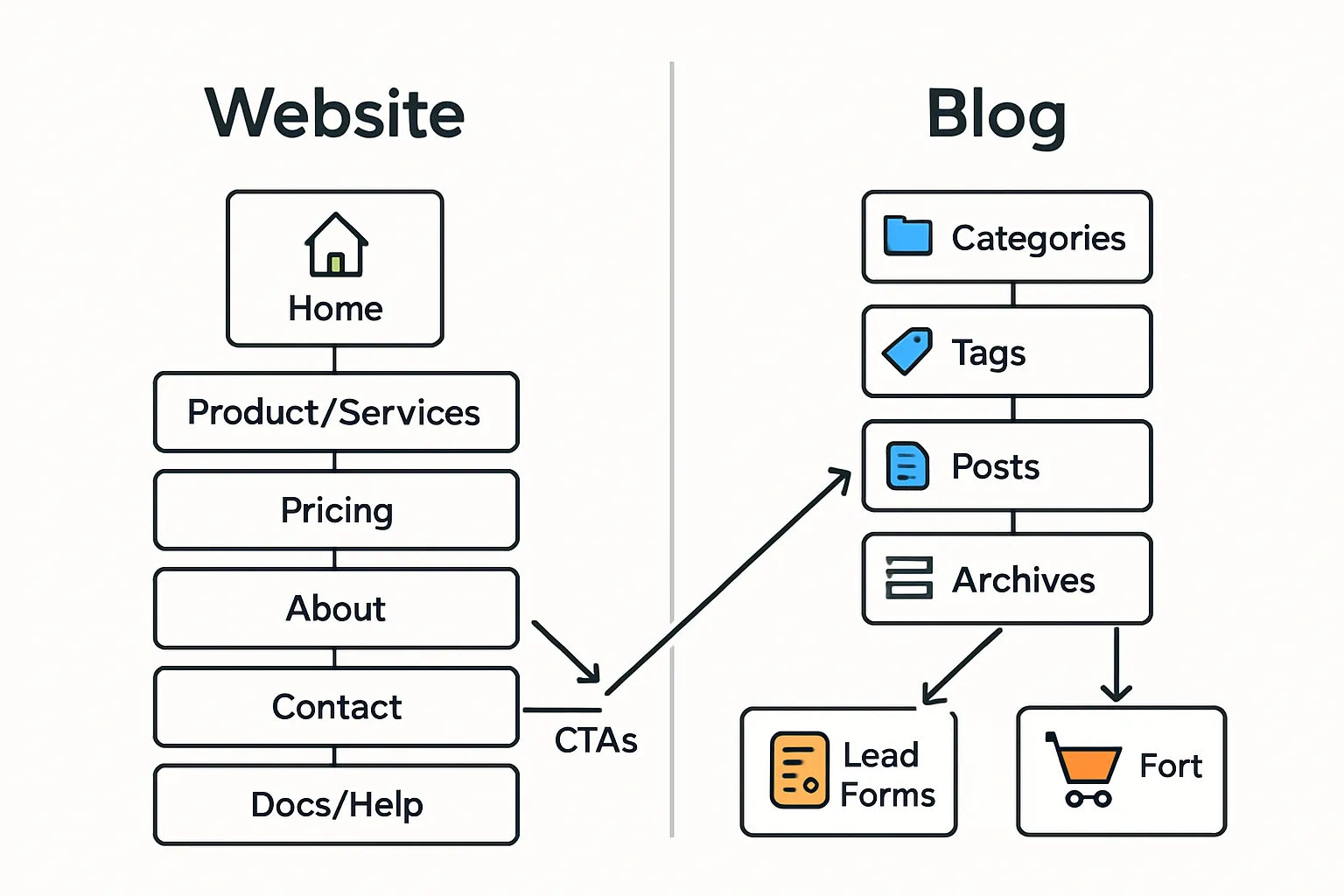
“Website blog” combo
Pairing a blog inside your website compounds reach and revenue: posts capture long-tail demand and link to your core pages; your website converts that attention into trials, demos, and sales. This flywheel strengthens topical authority, improves internal linking, and shortens the journey from learning to buying.
Blog vs Website comparison matrix
Attribute | Blog | Website |
|---|---|---|
Purpose | Discoverability, education, trust-building | Brand presence, conversion, product/service info |
Primary outcomes | Organic traffic, subscribers, engagement | Leads, signups, purchases, bookings |
Content cadence | Frequent, ongoing updates (weekly/daily) | Infrequent updates (when offers change) |
Information architecture | Time-based archives; categories/tags | Hierarchical pages; hubs and subpages |
Navigation patterns | Topic/category menus; recent/popular posts | Header/footer menus; utility links |
SEO role | Capture long-tail and informational intent | Rank for core commercial and navigational intent |
Analytics focus | Session growth, read depth, returning readers | Conversion rate, pipeline, revenue attribution |
Monetization | Ads, affiliates, sponsored content, digital goods | Product sales, subscriptions, services, demos |
Maintenance & workflow | Editorial calendar, content refresh cycles | Product/site updates, A/B tests, CRO |
Team skills | Content strategy, writing, on-page SEO | UX, product marketing, CRO, branding |
KPIs | Organic sessions, rankings, backlinks, email subs | SQLs/MQLs, trials, ASP, LTV, CAC |
Content types | How-tos, guides, comparisons, news, thought leadership | Home, Pricing, Features, Docs, Help, About, Legal |
CTAs | Subscribe, download, learn more, soft offers | Start trial, book demo, get a quote, buy now |
Internal linking | Posts → pillar pages → product | Core nav → feature/solution pages → conversion |
SEO, Traffic, and UX in 2025: How Blogs and Websites Work Together
"Organic search drives 53% of trackable website traffic." - Smart Insights (2023)
Search + content strategy that compounds
Map ToFu/MoFu/BoFu queries to content types:
ToFu (awareness): blog posts that answer how/what/why queries, comparisons-by-problem, checklists, statistics roundups.
MoFu (consideration): solution pages, pillar posts, case studies, buyer’s guides, “best tools” and “vs” content.
BoFu (decision): feature pages, pricing, demos/trials, implementation guides, integration pages, ROI calculators.
Use posts to win discovery; use pages to win decisions:
Posts target long-tail informational and evaluative keywords; pages target commercial intent and branded queries.
Cluster by topic to build authority:
Create one pillar page per core problem; link 6–12 supporting posts to it and to the relevant feature/pricing pages.
Cadence and refresh:
Publish consistently (e.g., 2–4 posts/week) and refresh high-value posts every 3–6 months to maintain rankings.
Internal linking that prints results
From posts to product/feature pages, pricing, and demos:
Add 2–3 contextual links with descriptive anchor text within the first 50% of the article.
Use end-of-post CTAs to route to demos/trials, case studies, or pricing.
Surface product modules (lightweight comparison tables or feature callouts) inside posts without interrupting UX.
From feature pages back to definitive guides and help docs:
Link “Learn more” to pillar guides, implementation tutorials, and FAQs.
Add “Related resources” blocks to feature pages to reduce bounce and increase time-on-site.
Sitewide scaffolding:
Maintain breadcrumbs (BreadcrumbList), related posts, and category hubs.
Keep navigation labels consistent between your website and blog.
Structured data and snippet strategy
Article/BlogPosting on posts for eligibility in rich results (headline, author, dateModified, image).
FAQPage on relevant sections (avoid overuse; ensure the Q&As are visible on-page).
HowTo for step-by-step tutorials with clear steps, tools, and images.
Product/Offer/AggregateRating on product/feature pages, plus Review where applicable.
BreadcrumbList across site/blog for clearer indexing and sitelinks.
Organization/Person markup to reinforce E-E-A-T (brand and author credibility).
Sitelinks search box for branded queries where relevant.
Performance and UX basics
Core Web Vitals targets:
LCP < 2.5s, INP < 200ms, CLS < 0.1 on mobile.
Image and asset strategy:
Serve AVIF/WebP, lazy-load below-the-fold, prefetch critical resources, use responsive srcset.
Mobile-first patterns:
Thumb-friendly CTAs, readable line length, accessible color contrast, keyboard-ready components.
Clean reading UX:
Clear H2–H3 hierarchy, scannable lists, short paragraphs, table of contents for long posts.
Accessibility:
Descriptive alt text, focus states, ARIA labels where necessary, semantic HTML.
AI/LLM search readiness
Topical clusters with tight internal linking help AI overviews understand coverage depth.
Author profiles with credentials, headshots, and links to social/organization schema.
Transparent sources and citations within posts; link to primary data and documentation.
Update cadence (dateModified) signals freshness; maintain change logs for major updates.
Provide structured summaries (key takeaways, FAQs) and clear definitions to improve extractability.
Use canonical URLs and avoid near-duplicate posts targeting the same intent.
Newsletter and retention loops
Turn organic visitors into subscribers:
Contextual lead magnets per category (templates, checklists, mini-courses).
Inline and end-of-post opt-ins; frictionless forms; clear value promise.
Automate nurture:
Send a 5–7 email welcome series mapping ToFu → MoFu → BoFu with soft-to-strong CTAs.
RSS-to-email or weekly digests to maintain engagement.
Recirculation:
Post-purchase or post-signup onboarding emails that deep-link to docs, feature walkthroughs, and advanced guides.
Measure and iterate:
Track assisted conversions from posts → product pages, subscriber-to-trial rates, and content-influenced pipeline.
Navigation and Information Architecture: Categories, Tags, Subfolders
Build a beginner-proof menu
Keep your primary navigation tight (5–7 items) to reduce cognitive load and help users reach key pages fast.
Place Blog, Docs/Help, and Changelog where users expect them - in the main nav for SaaS, or as utility links/top-right for simpler sites.
Mirror key links in the footer (About, Careers, Privacy, Terms) for consistency and crawl coverage.
Categories and tags that scale (and don’t cannibalize)
Create 6–12 evergreen categories that map to your core problems, products, or audience segments.
Use tags for specificity (features, versions, industries, tactics). Avoid turning tags into thin archives.
Consolidate near-duplicate categories; merge or 301 dead-end tags; keep naming consistent.
Define ownership: content ops curates categories; editors approve new tags; review quarterly to prevent bloat.
URL best practices for a website and blog
Recommended structure:
/blog/
/blog/category/
/blog/post-slug/
Use readable, keyword-relevant slugs; avoid dates in URLs unless you are a news-first site.
Keep category slugs short and durable (e.g., /blog/seo/, not /blog/search-engine-optimization-tips/).
Standardize trailing slashes and case; set one canonical per URL.
Archive hygiene
Noindex thin tag archives and author archives if they’re duplicative or empty; keep primary category archives indexable.
Paginate long category archives and include rel="next/prev" patterns if applicable.
Enable breadcrumbs sitewide and submit a clean XML sitemap; include category pages as hubs.
“Website for a blog” checklist
If the blog is your core product:
Keep Home, About, and Contact minimal and conversion-focused (subscribe, join community, hire me).
Prominent category hub links above-the-fold; clear value prop for subscribers.
Add a Start Here or Pillars page to orient new readers.
Category/Tag templates by business type
Business Type | Example Categories (5–7) | Example Tags (samples) |
|---|---|---|
SaaS | SEO, Product Updates, Use Cases, Integrations, Security & Compliance, Analytics, Customer Stories | “keyword research”, “release v3.2”, “Zapier”, “SOC 2”, “GA4”, “B2B SaaS” |
eCommerce | Buying Guides, How-To, Style/Trends, Product Care, Brand Stories, Gift Ideas, Reviews | “summer 2025”, “linen”, “size guide”, “under $50”, “eco-friendly” |
Local Service | Services, Pricing/Offers, Case Studies, Neighborhood Guides, How-To, Safety/Compliance | “emergency”, “same-day”, “zip 94110”, “permit”, “seasonal” |
Creator | Tutorials, Gear/Tools, Behind the Scenes, Business of Creation, Community, Newsletter | “premiere pro”, “lighting”, “workflow”, “sponsorships”, “templates” |
Visual URL map and internal link flow
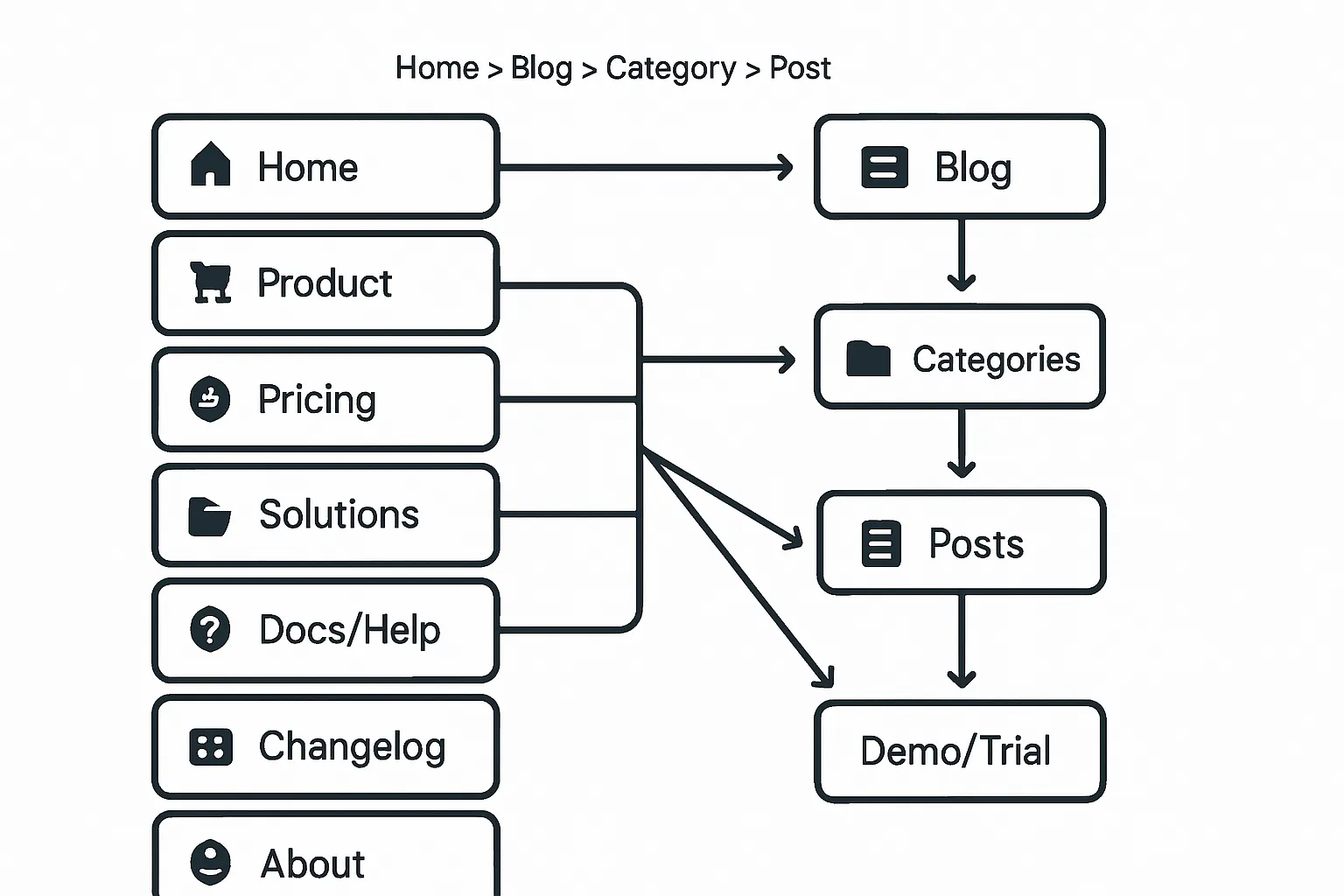
Breadcrumbs: Home > Blog > Category > Post
Post → Product, Pricing, Demo/Trial internal links
Docs/Help and Changelog linked from both Product pages and relevant posts
Website Blogs Examples: How Real Brands Structure It (URL Blueprints)
SaaS (e.g., Stripe, Intercom, Notion)
Common pattern: yourdomain.com/blog with topical hubs (e.g., /blog/engineering/, /blog/product/).
Link posts to product docs (/docs/feature) and case studies (/customers/brand).
Use pillar pages for solutions (e.g., /solutions/use-case/) and route MoFu traffic from related posts.
eCommerce (e.g., Shopify, Beardbrand)
Pattern: yourstore.com/blog with categories like Guides, Recipes, Style, How-To.
CTAs drive to collections (/collections/category/) and PDPs (/products/sku-slug/).
Seasonal category hubs (e.g., /blog/holiday-gifts/) interlink with curated collections.
Marketplaces and platforms (e.g., Zapier)
Pattern: /blog + /learn hubs (e.g., /learn/automation/).
Heavy internal linking to integrations (/apps/app-name/integrations/) and tutorials (/learn/app-workflows/).
Comparative content (X vs Y) funnels to app directories and signup.
Local services (e.g., dental/medical)
Pattern: /blog with local content and service pages (/services/procedure/).
Location pages (/locations/city/) interlink with relevant posts for local SEO.
Clear CTAs to booking (/book/) and insurance/coverage pages.
“About blog website” essentials
About the blog: purpose, audience, scope of topics.
Editorial guidelines: sourcing, updates, review process, stance on AI.
Author pages: bios, credentials, social links, and author schema for E-E-A-T.
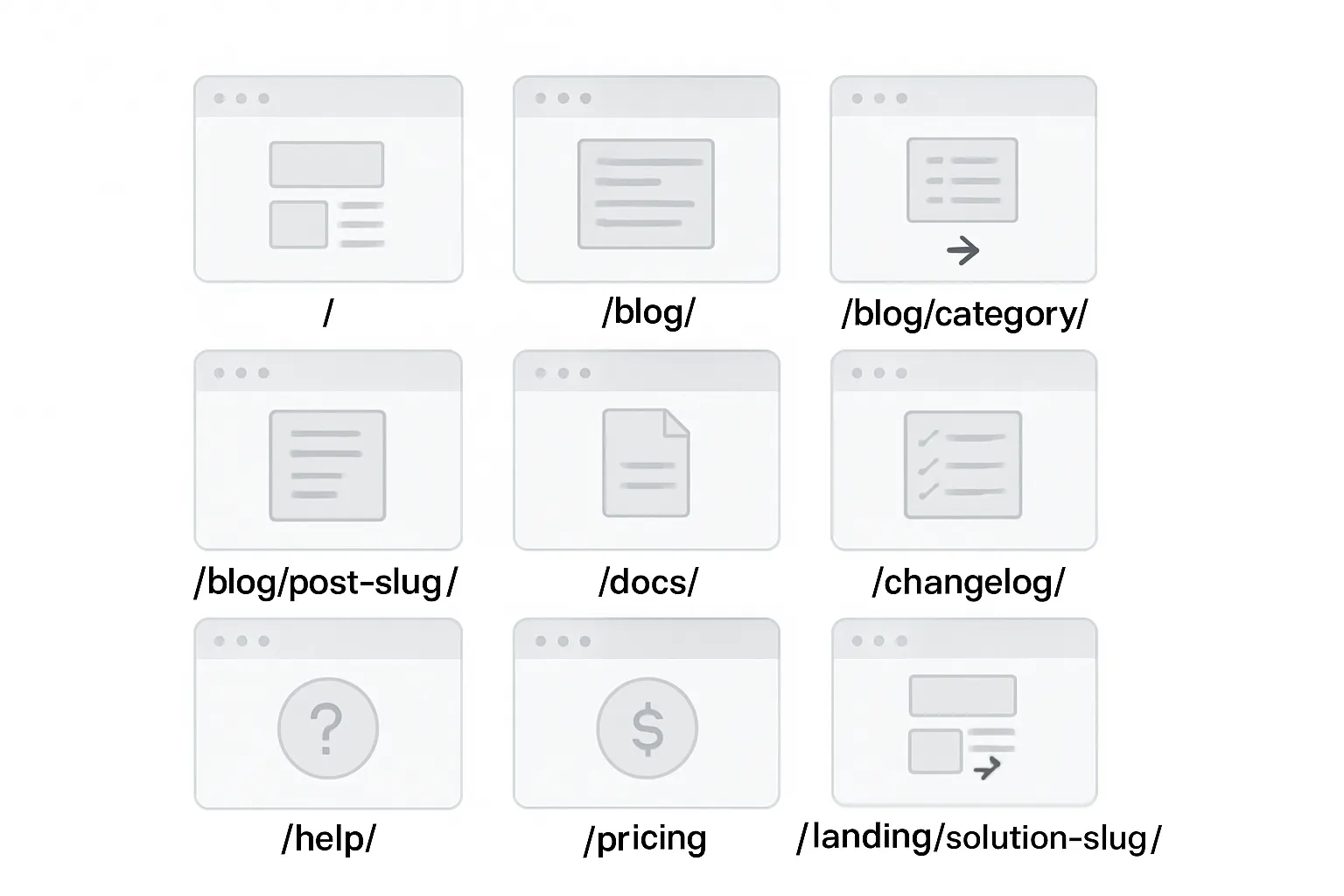
Copy-and-paste URL blueprints
Home: /
Blog hub: /blog/
Blog category: /blog/category/
Blog post: /blog/post-slug/
Docs hub: /docs/
Doc article: /docs/topic/article-slug/
Changelog: /changelog/
Help center: /help/
Feature page: /features/feature-slug/
Pricing: /pricing/
Solutions/Industry hub: /solutions/industry-slug/
Customer stories: /customers/brand-slug/
Landing page: /landing/solution-slug/
Book demo: /demo/
Contact: /contact/
Legal: /legal/terms/ and /legal/privacy/
How to Choose Right Now (Simple Decision Paths)
If you sell a product/service today
Launch a lean website first (Home, Product/Service, Pricing, About, Contact). Add /blog in a subfolder as soon as possible.
Prioritize conversion paths (Start Trial, Book Demo, Get a Quote). Link relevant posts to these pages.
If audience and authority are priority
Launch the blog first (with a basic site shell). Publish 2 high-quality posts/month minimum.
Build topical clusters and pillar pages; capture long-tail search, then route to lead magnets and soft offers.
If you’re a local business
Website first for NAP/citations (Name, Address, Phone), location/service pages, and reviews.
Use the blog for local questions, FAQs, and service explainers targeting neighborhoods and common problems.
If you’re a creator or consultant
Blog early to prove expertise; include case studies and deep-dive tutorials.
Add a clear “Hire me/Work with me” page with calendar/booking and a simple contact form.
Migration notes (if you change later)
Preserve URLs or 301 to new equivalents; keep redirects for at least 12 months.
Update internal links, menus, and canonical tags; refresh XML sitemaps.
Re-verify and re-submit in Search Console; request reindexing for critical pages.
Maintain analytics continuity (same GA/Pixel property, consistent UTMs).
Audit for mixed content, duplicate pages, and orphaned posts after the move.
Build Both in Under an Hour with BlogBowl (No Code)
Why BlogBowl for a website and blog
Lightning-fast, SEO-optimized templates that rank in Google and LLMs.
AI automations: daily SEO articles, internal linking, keyword research, and embedded media.
Unlimited blogs, changelogs, and help docs; custom domains; privacy-friendly analytics.
Instant “website blog” setup: clean navigation, categories, tags, and subfolders out of the box.
Reverse-proxy helper for subfolder placement (/blog) even if your main site is elsewhere.
Built-in newsletter and lead capture to convert search traffic into subscribers and trials.
Scales from a simple website for a blog to multi-property content ops with team roles and approvals.
7-step quick start
Create workspace and pick a template for Home + /blog.
Choose layouts optimized for speed, readability, and conversions (pricing, demo, newsletter CTAs baked in).
Connect domain; choose subfolder or subdomain; use reverse proxy helper if needed.
Recommended: yourdomain.com/blog for consolidated authority and simpler UX.
Select categories and tags (use included IA presets by industry).
SaaS, eCommerce, Local, and Creator presets ensure your information architecture scales.
Turn on AI: keyword plan, daily posts, internal linking, and image/video embeds.
BlogBowl generates outlines, drafts, and smart anchors that point to features, pricing, and docs.
Customize branding (colors, fonts, layouts) and add CTAs (demo, pricing, newsletter).
Drag-and-drop blocks for testimonials, feature grids, comparison tables, and TOCs.
Enable built-in newsletter; add lead magnet and welcome sequence.
Convert organic traffic to subscribers with category-specific lead magnets and automated drips.
Review analytics dashboard; tune topics and CTAs monthly.
See “post → page → conversion” paths, refine internal links, and double down on winning clusters.
Pro tips
Spin up Docs and Changelog in minutes; interlink with blog and product pages to boost UX and SEO.
Use automatic backlink exchange to accelerate authority and enrich your internal link graph.
Invite teammates and set roles; approve content before publish; maintain an in-app editorial calendar.
For “website blogs examples” inspiration, start with our prebuilt URL blueprints: /blog/, /blog/category/, /docs/, /changelog/, and conversion-ready landing pages.
If you’re building a website for a blog as the core product, keep Home/About/Contact simple and focus your CTAs on subscribe, join, or hire.
Conclusion: Start Strong - Launch Your Website + Blog with BlogBowl
In 2025, the winning play isn’t website vs blog - it’s website and blog working together.
Put your blog in a subfolder by default, structure clean categories, and publish consistently.
BlogBowl removes the setup and upkeep friction so you can focus on content and customers.
Call to action
Launch your website + /blog in minutes with BlogBowl. Connect your domain, choose your template, and turn on AI to grow traffic on autopilot.
Get started: https://www.blogbowl.io