


Blog Templates: 11 Best Picks for Faster Publishing
Choosing the right blog templates is not a design decision alone. For SaaS teams, startup founders, indie hackers, and B2B marketers, it is a speed, SEO, and conversion decision.
A weak template slows publishing, creates setup friction, hurts rankings, and forces your team to duct-tape together extra tools for newsletters, analytics, and documentation. A strong template does the opposite: it helps you launch fast, publish consistently, rank better, and turn traffic into subscribers.
That is exactly why modern teams are moving toward all-in-one publishing systems instead of generic themes. With BlogBowl, you can launch a blog, changelog, or help center in minutes with no code, use fast SEO-optimized templates, connect a custom domain, collaborate with your team, collect subscribers with a built-in newsletter, and track results in a clean Umami-powered analytics dashboard.

What Makes a Great Blog Template Today?
The best blog templates are built for more than looks. They help your team move faster and remove technical drag.
The 6 qualities that matter most
Criteria | Why It Matters | What to Look For |
|---|---|---|
Speed | Faster pages improve UX, SEO, and conversions | Lightweight code, fast loading, mobile performance |
SEO structure | Good templates help search engines understand your content | Clean heading hierarchy, schema-friendly structure, indexable pages |
Conversion design | Traffic is useless if visitors do not subscribe or take action | CTA blocks, email capture, sticky forms, smart content layout |
Publishing simplicity | Teams need to ship content without waiting on devs | No-code editing, reusable sections, fast setup |
Scalability | Your blog often expands into changelogs, docs, and campaigns | Multi-site support, team collaboration, flexible URLs |
Analytics | You need to know what content actually works | Built-in traffic, engagement, and subscriber insights |
"Websites loading in 1 second have conversion rates three times higher than those loading in 5 seconds." - PandaCodeGen
"The average open rate for newsletters is approximately 40.5%, nearly double that of standard marketing emails." - ContentMation
That is why template choice matters more than most teams think. It affects not only how your site looks, but also how fast you can grow.
Content Gaps Most “Best Blog Template” Articles Miss
Most competitor articles do a decent job listing templates. But they usually miss the strategic layer. Here are the big gaps:
1. They focus on aesthetics, not publishing velocity
Most roundups judge templates by visual style. Founders and marketers care about how quickly a team can launch and publish.
2. They ignore newsletter integration
A blog template without subscriber capture is incomplete. If you need separate tools for email collection, sending, and tracking, your workflow gets messy fast.
3. They do not connect blogs with changelogs and help docs
For SaaS, your content system is usually not just a blog. You also need product updates and support content. The best template setup should handle all three.
4. They rarely mention analytics
A nice layout is not enough. You need to know which posts get views, where traffic comes from, how long readers stay, and what converts.
5. They overlook ownership and extensibility
Teams increasingly care about control: custom domains, flexible hosting, and open-source foundations.
That is where BlogBowl stands out. It is not just a template gallery. It is a faster way to run your full content operation from one place.
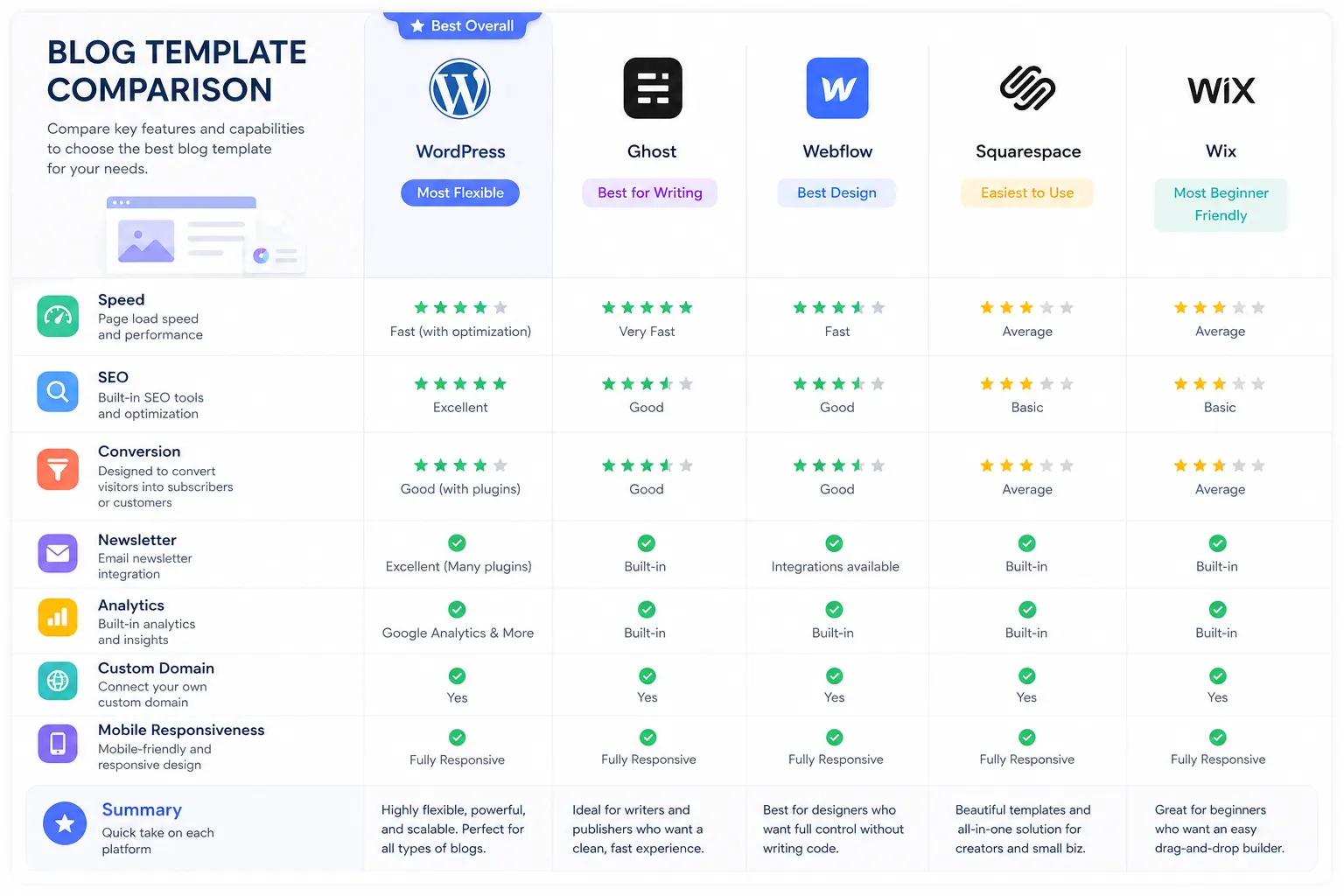
11 Best Blog Template Picks for Faster Publishing
Below are the best blog template styles and use cases to consider. Instead of just naming themes, this guide focuses on what each template type helps you achieve.
1. Minimal SaaS Blog Template
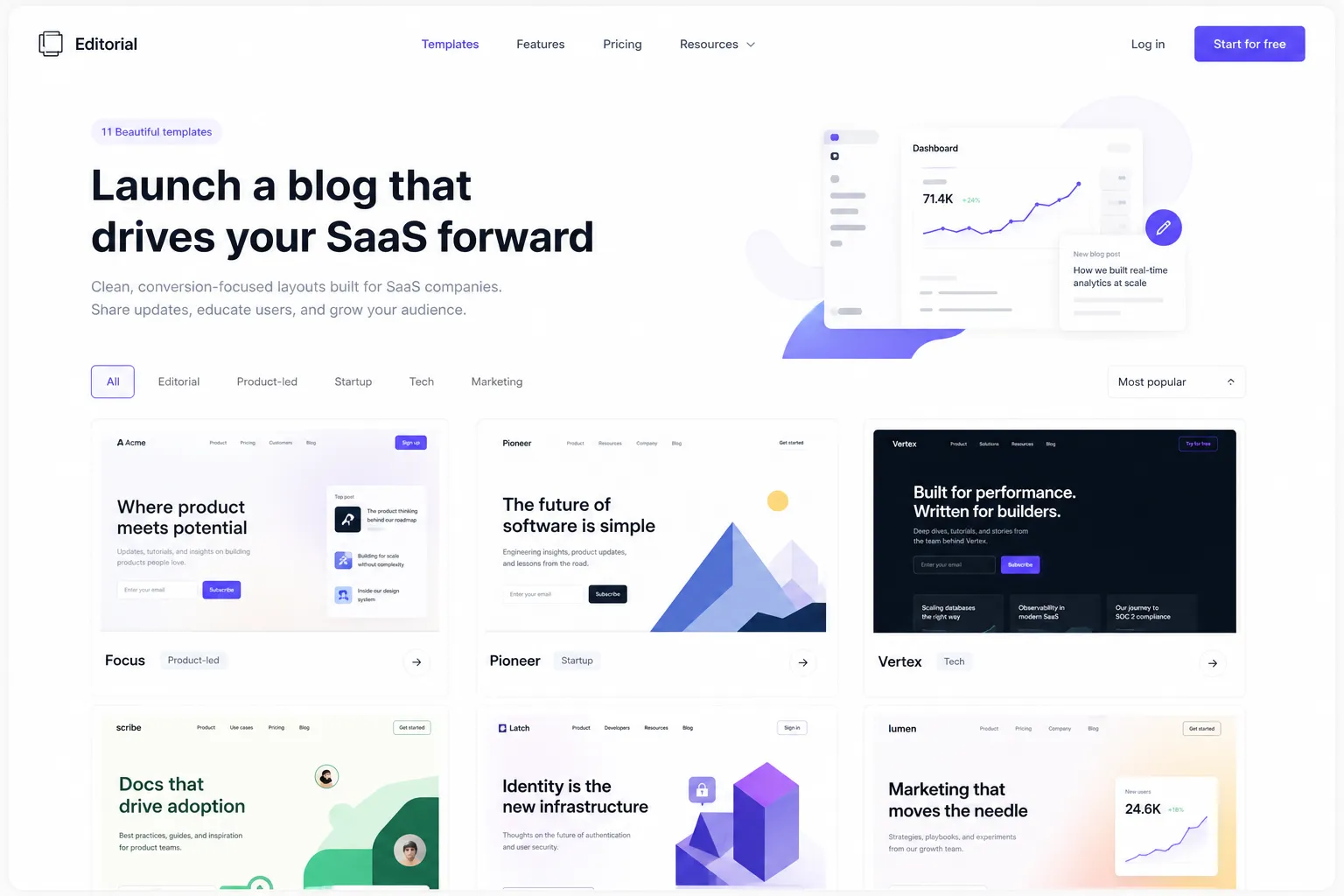
A minimal template strips away clutter and puts the content first. It is ideal for SaaS brands publishing thought leadership, product education, and SEO articles.
Best for: startups, B2B SaaS, product marketing
Strengths: readability, speed, clean structure
Watch out for: weak conversion elements if the template is too bare
Choose this if your goal is to publish fast and rank consistently without overdesigning every page.
2. Newsletter-First Blog Template
This type of template is built around subscription growth. The homepage, post pages, and CTAs all guide readers toward joining your list.
Best for: founders building audience, media-style SaaS brands
Strengths: subscriber capture, repeat traffic, built-in growth loops
Watch out for: some tools require extra email integrations
With BlogBowl, this gets much simpler because newsletter capture, sending, scheduling, and tracking are built into the same platform.
3. SEO-Focused Content Hub Template
This template is designed for teams publishing at scale. It prioritizes internal linking, category structure, clean archives, and content discoverability.
Best for: high-volume content teams, SEO-led startups
Strengths: better crawlability, topic clustering, scalable archives
Watch out for: can feel generic if branding is weak
If SEO is your main growth channel, this is often the safest pick.
4. Product-Led Blog Template
A product-led template blends educational content with subtle product positioning. It helps readers move from problem awareness to trial intent.
Best for: SaaS product marketing teams
Strengths: conversion-friendly, demo CTAs, feature storytelling
Watch out for: can become too salesy if overdone
The sweet spot is content that teaches first, then introduces the product naturally.
5. Founder Brand Template
This style leans into personality. It works well for indie hackers, solo founders, and creator-led software brands.
Best for: personal brands, founder-led marketing
Strengths: trust, distinct voice, memorable positioning
Watch out for: may not scale cleanly into docs or company-wide content ops
This is great when the founder is a key part of the brand story.
6. Media-Style Publication Template
A publication-style template supports multi-category content, featured posts, multiple authors, and editorial workflows.
Best for: content-heavy B2B companies, newsletters, digital publications
Strengths: content discovery, authority, multi-author support
Watch out for: can get heavy if the layout is too complex
For growing teams, BlogBowl’s multi-author collaboration makes this model much easier to manage.
7. Documentation-Adjacent Blog Template
Some companies want a blog that sits naturally beside a help center or knowledge base. This template style creates that connection.
Best for: product-led SaaS, customer success teams
Strengths: smooth transition between marketing and support content
Watch out for: many template tools separate blogs and docs awkwardly
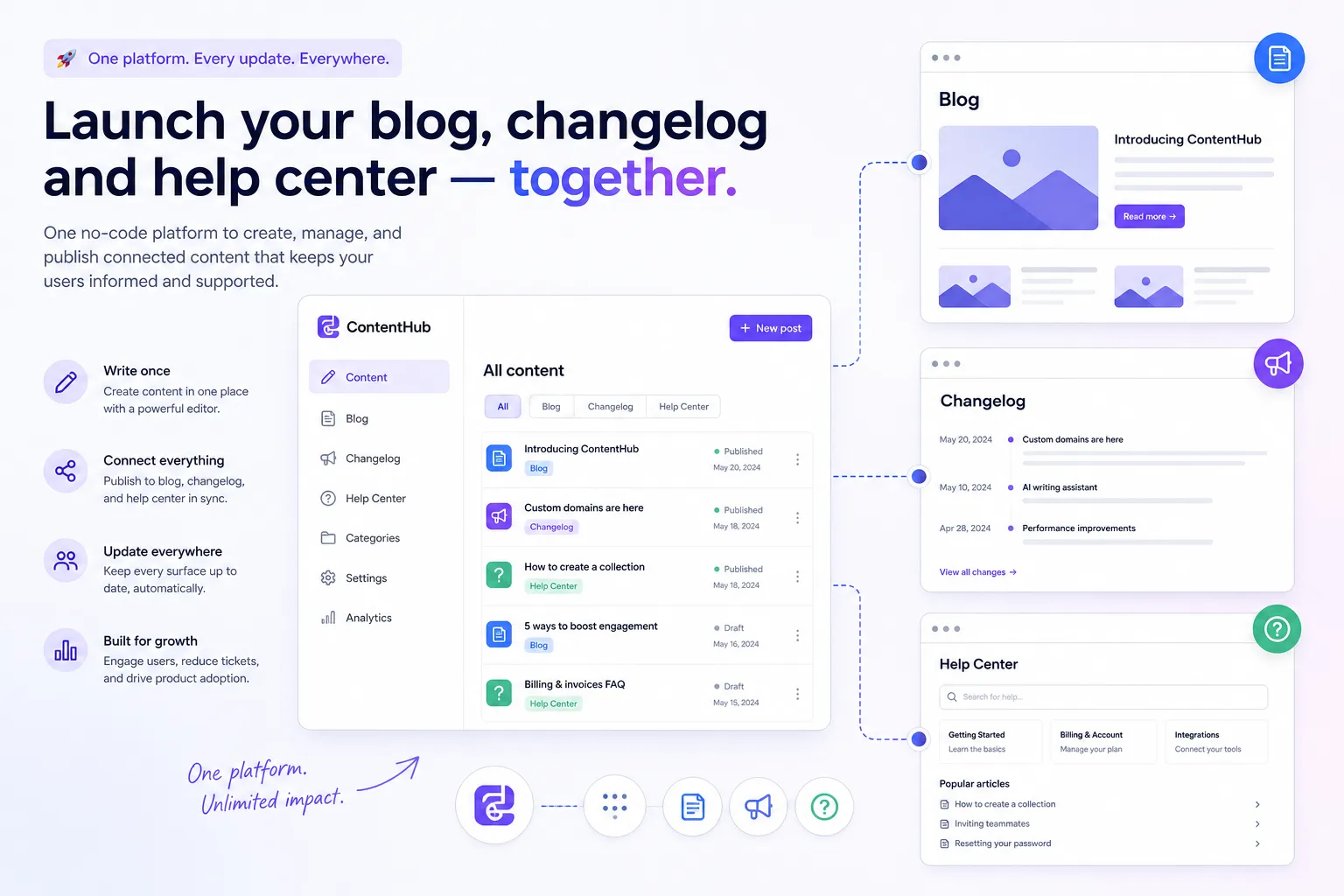
BlogBowl is especially strong here because you can run your blog, changelog, and help docs from the same platform.
8. Changelog-Integrated Template
This format works well for teams that publish product updates frequently and want those updates to support SEO, transparency, and retention.
Best for: SaaS apps shipping regular features
Strengths: product communication, trust, update visibility
Watch out for: standalone changelog tools often feel disconnected from your main site
A unified template system prevents that fractured experience.
9. Conversion Landing Blog Template
This template style borrows from landing pages. It uses stronger sections, sharper CTAs, and more modular layouts to turn traffic into leads.
Best for: demand gen teams, campaign-driven blogs
Strengths: higher opt-in potential, strong CTA placement
Watch out for: too many elements can hurt readability
Use it when lead capture matters as much as traffic.
10. Technical / Developer Blog Template
If your audience includes developers or technical buyers, the template must handle code blocks, product walkthroughs, and deep documentation cleanly.
Best for: devtools, APIs, infrastructure SaaS
Strengths: supports technical content, cleaner formatting, trust with technical readers
Watch out for: some flashy templates make code content harder to read
This is a strong fit for teams that publish tutorials, release notes, and implementation content.
11. Flexible All-in-One Template Platform
This is the most strategic option: not just a single template, but a publishing platform with fast templates plus everything else needed to operate content.
Best for: SaaS teams that want speed and simplicity
Strengths: no-code publishing, SEO-ready templates, built-in newsletter, analytics, docs, changelog, custom domains
Watch out for: only works if the platform truly stays lightweight and easy
This is where BlogBowl wins. Instead of patching together a CMS, email tool, analytics tool, and docs system, you get one fast workflow for all of it.
How to Choose the Right Blog Template for Your Team
The best template depends on your business model, team size, and publishing goals.
Quick decision matrix
If you want to... | Choose this template type |
|---|---|
Publish SEO articles fast | SEO-focused content hub |
Grow an email list | Newsletter-first template |
Support blog + docs + changelog | All-in-one template platform |
Build founder authority | Founder brand template |
Convert blog readers into trials | Product-led or conversion template |
Run an editorial team | Media-style publication template |
Educate technical buyers | Technical/developer template |
Ask these 7 questions before deciding
How fast can we launch?
Can non-technical teammates publish without help?
Does it support SEO basics out of the box?
Can we collect and email subscribers natively?
Do we get useful analytics without another tool?
Can it scale into changelogs and help docs?
Do we have control over domain and hosting setup?
If a template fails more than two of these, it will likely create friction later.
Why BlogBowl Fits Modern SaaS Publishing Better
Many template tools solve just one layer of the problem. BlogBowl solves the full workflow.
Launch in minutes, not weeks
You can start a blog, changelog, or help center without setup headaches. No wrestling with plugins, themes, or engineering queues.
No-code by default
Your product marketer, founder, or support lead can publish and manage content directly. No developer bottleneck.
Fast, SEO-optimized templates
BlogBowl templates are built for performance and search visibility, so you do not need to compromise speed for design.
Built-in newsletter
Collect subscribers, send campaigns, schedule emails, and track opens and clicks from the same place you publish.
Integrated analytics
The built-in Umami-powered analytics dashboard shows views, visitors, session data, referrers, and geography in a simple, actionable view.
Flexible deployment and ownership
Use a custom domain, publish under a subdirectory like /blog, use a subdomain, or go with a hosted setup. Plus, the open-source core gives you more control and extensibility.
Team-friendly scaling
With paid plans, you can run unlimited blogs, changelogs, and help docs, making it a strong fit for companies growing their content footprint.
The Hidden Cost of the Wrong Blog Template
A bad template does not just look outdated. It slows everything down.
Common costs teams underestimate
Extra engineering time for setup and fixes
Slower publishing cycles
Poor mobile experience
Weak SEO structure
Missing subscriber capture
Fragmented analytics
Separate tools for blog, docs, and newsletter
Painful redesigns later
When you stack those costs together, a “free” or generic template often becomes the expensive choice.
Best Practices to Get More From Any Blog Template
Even the best template needs the right operating habits behind it.
Keep layouts simple
Readers come for clarity, not visual gymnastics. Use clean headings, short paragraphs, and obvious CTAs.
Build around one primary action
Do not ask readers to do five things. Usually the right action is:
subscribe
start a trial
read a related post
visit a feature page
Create content clusters
Use templates with category pages, related articles, and internal links to support stronger SEO.
"Blogs that publish 16 or more posts per month experience 3.5 times more traffic compared to those publishing less frequently." - Digital Applied
Design for mobile first
Most readers will meet your content on mobile. Fast load time and clean text layout matter more than fancy flourishes.
Measure what moves
Track:
top pages
traffic sources
average session time
subscriber growth
email opens and clicks
This is another reason BlogBowl is compelling: the analytics and newsletter metrics are already in the system.
Common Mistakes When Picking Blog Templates
Choosing based on looks alone
A beautiful template that publishes slowly is a growth blocker.
Ignoring newsletter flow
If there is no built-in path from reader to subscriber, you are leaving value on the table.
Forgetting future use cases
Today you need a blog. In three months you may also need release notes and docs.
Overcomplicating the stack
More plugins and tools usually mean more maintenance, more breakage, and more friction.
Not thinking about team workflows
Can multiple authors collaborate easily? Can non-technical people make updates? These questions matter.
Final Verdict: Which Blog Template Approach Wins?
If you want the simplest answer, here it is:
Choose a minimal or SEO-focused template if your main priority is organic traffic.
Choose a newsletter-first or conversion template if audience growth is the top goal.
Choose an all-in-one publishing platform if you want the best mix of speed, SEO, conversion, and operational simplicity.
For modern SaaS teams, that last option is usually the smartest move.
BlogBowl is a strong choice because it combines the things most teams otherwise buy separately: fast blog templates, no-code publishing, changelogs, help docs, built-in newsletters, clean analytics, custom domain flexibility, and open-source control.
Instead of spending weeks setting up a patchwork stack, you can launch a polished content hub in minutes and start publishing right away.
If your team wants to move faster, rank better, and convert more traffic without technical overhead, try BlogBowl.
FAQ
How to get 1000 views per day on a blog?
To reach 1,000 daily blog views, you need a fast SEO-friendly template, consistent publishing, strong internal linking, and clear conversion paths that bring readers back through email. Focus on topic clusters, publish regularly, and use a platform like BlogBowl to combine content, newsletters, and analytics in one workflow.
What is the 80/20 rule for blogging?
The 80/20 rule for blogging usually means a small share of your posts drives most of your traffic and leads. The smart move is to identify those winners, update them, improve CTAs, and use the right blog template to support speed, readability, and subscriber growth.
How many YouTube views do I need to make $10,000 per month?
There is no fixed number because earnings depend on RPM, niche, audience geography, and monetization mix. In practice, creators usually need hundreds of thousands to millions of monthly views unless they pair content with higher-value offers like software, newsletters, or products.